
What is Codestral
Codestral is a code generation AI model launched by the French AI startup Mistral AI, designed specifically to improve software development efficiency. It supports over 80 programming languages, including but not limited to mainstream languages such as Python, Java, C, and C++, as well as domain-specific languages such as Swift and Fortran. Codestral can understand natural language instructions and help developers quickly complete programming tasks, such as writing code, generating test cases, and completing partial code. As a 22-billion-parameter model, Codestral surpasses previous code generation models in terms of performance and response time.
Basic information about Codestral
| Model name | Codestral-22B-v0.1 |
| Number of model parameters | 22 billion |
| Context window | 32k |
| Model license | MNPL (Non-Production License), i.e., for non-commercial research and testing purposes |
| Supported programming languages | 80+ |
Main features of Codestral
- Code completion: Codestral can understand the code a developer is writing and predict the next code snippet that may be needed for automatic completion. This not only saves developers time typing on the keyboard, but also reduces errors caused by manual input.
- Code generation: Developers can provide Codestral with a natural language description and request code that generates a specific function. Codestral can understand these descriptions and generate code segments that meet the requirements.
- Writing tests: Codestral can help developers automatically generate test code, which helps ensure that newly written features work as expected and do not introduce new errors.
- Multilingual compatibility: Codestral supports more than 80 programming languages. No matter which language developers use, Codestral can provide corresponding assistance.
- Error detection and repair: During the code writing process, Codestral can identify potential errors and bugs and provide repair suggestions or automatically fix them, thereby improving code quality and stability.
- Code understanding and explanation: Codestral can analyze code and explain its functionality, which is especially useful for learning and understanding other people's code.
- Interactive programming assistance: Codestral's conversational interface allows developers to interact with the model in natural language, ask questions, or request help, and Codestral can provide immediate feedback and suggestions.
- Documentation and comment generation: Codestral can also automatically create documentation and comments based on the generated code, helping developers better maintain and understand the code.
- Code refactoring suggestions: Codestral can analyze existing code and propose improvement suggestions, helping developers optimize code structure and improve code readability and maintainability.
Codestral's performance
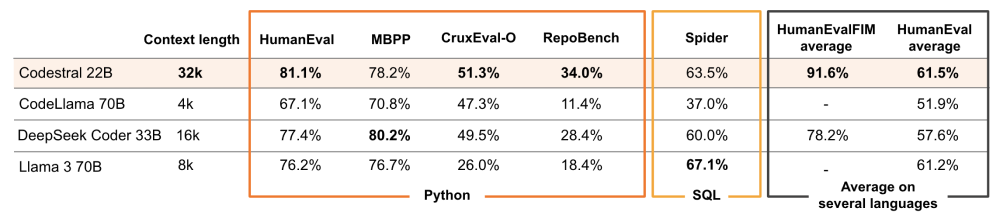
- Context window: Codestral has a 32k context window, which enables it to perform better when handling long-distance dependencies and complex code structures compared with other models (such as CodeLlama 70B's 4k, 8k, or DeepSeek Coder 33B's 16k).
- Performance/latency: As a 22B-parameter model, Codestral has set a new industry standard in the performance and latency of code generation. In particular, in the RepoBench evaluation, it outperforms other models on long-distance code generation tasks.
- Programming Language Evaluation:
- Python: In HumanEval pass@1, Codestral achieved an 81.1% pass rate, demonstrating excellent Python code generation capabilities.
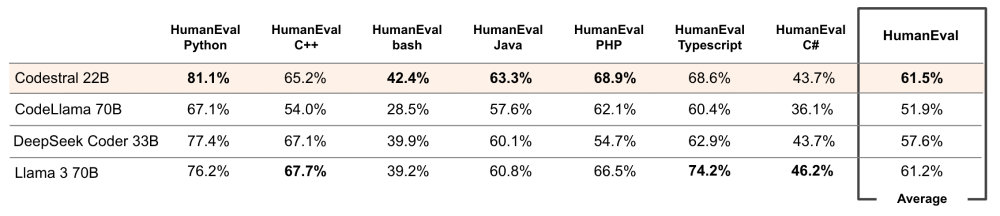
- Multilingual Evaluation: Codestral's HumanEval pass@1 evaluation on languages including C++, bash, Java, PHP, Typescript, and C# shows that it has cross-language code generation capabilities, with an average pass rate of 61.5%.
- Python: In HumanEval pass@1, Codestral achieved an 81.1% pass rate, demonstrating excellent Python code generation capabilities.
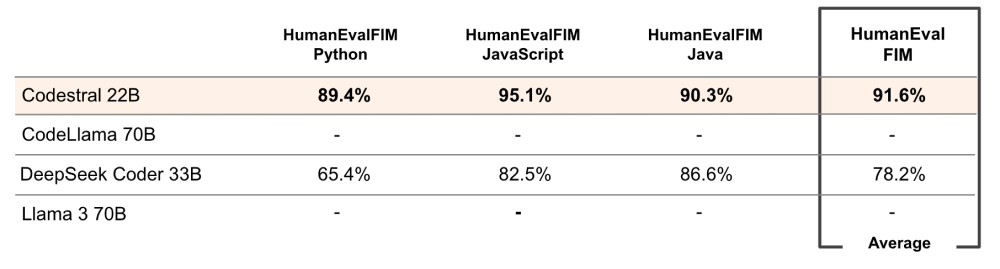
- Fill-in-the-Middle Performance: In the HumanEvalFIM evaluation for Python, JavaScript, and Java, Codestral's fill-in-the-middle performance, compared with DeepSeek Coder 33B, shows high accuracy, with pass rates of 89.4% and 95.1% for JavaScript and Java, respectively.
- Industry Reviews: Multiple experts and developers have highly praised Codestral's performance, believing that it has reached unprecedented levels in both speed and quality, especially in integrations with application frameworks such as LlamaIndex and LangChain, where Codestral demonstrates fast and accurate code generation capabilities.
How to Use Codestral
1. Conversational Interface
- Access Le Chat: Through theLe Chatchatbot provided by Mistral AI, interact with Codestral in natural language.
- Natural Language Commands: Use natural language commands to issue requests to Codestral, such as code generation, explanation, or testing.
2. Research and Testing
- Download the Model: Download the Codestral model from the HuggingFace platform (https://huggingface.co/mistralai/Codestral-22B-v0.1) for research and testing in non-production environments.
- Environment Configuration: Configure a local development environment to run Codestral based on the downloaded model files and documentation.
3. Via a Dedicated Terminal
- Obtain an API Key: Generate and manage API keys in your Mistral AI personal account.
- Call the API: Use the
codestral.mistral.aiendpoint to interact with Codestral via HTTP requests and perform code generation and editing tasks. - Beta Testing: Use the API endpoint for free during the beta testing period, andjoin the waitlistto gain access.
4. Use the Mistral Platform API
- Create an Account: On theMistral AI platform, register an account.
- Build an Application: Follow the guide to build applications using Codestral, leveraging the APIs and tools provided by the platform.
- Billing Usage: Billing is based on the actual number of tokens used.
5. Integrated Development Environment (IDE) Plugins
- Install the Plugin: Install a Codestral-supported plugin in an IDE such as VSCode or JetBrains, for example Continue.dev or Tabnine.
- Configure the Plugin: Configure the use of Codestral according to the plugin documentation, including API keys and preference settings.
- Code Generation and Interaction: Use the plugin directly in the IDE to generate code, complete code, or interact with Codestral.
6. Application Framework Integration
- Integrate Frameworks: Leverage Codestral's integration with application frameworks such as LlamaIndex and LangChain to quickly build intelligent applications.
- Use Framework Tools: Based on the documentation and tools provided by the framework, develop applications combining Codestral's functionality.
For more information, see Mistral AI's blog:https://mistral.ai/news/codestral/