
What is CodeFormer
CodeFormer is an AI photo and video restoration tool jointly developed by Nanyang Technological University and SenseTime. It combines Variational Autoencoder (VQGAN) and Transformer technology to perform high-quality restoration on blurry and mosaic-covered photos or videos. CodeFormer optimizes image details through advanced algorithms, enhancing clarity while maintaining a natural and realistic visual effect. It supports high-definition restoration of images and videos, is simple to use, open-source and free, and is suitable for various scenarios such as family album restoration, social media photo optimization, and professional image processing.
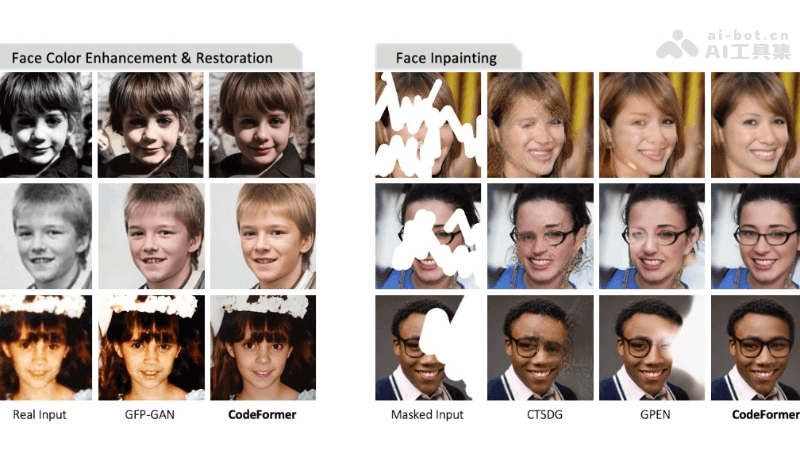
CodeFormer's Main Features
- HD Image Restoration: It can perform high-definition restoration on blurry images, enhancing image clarity and details.
- HD Video Restoration: For video content, CodeFormer can restore video clarity, making blurry videos clear.
- Mosaic Removal: Especially for mosaic areas in videos and images, CodeFormer can effectively remove them and restore the original image.
- Multi-Person Scene Processing: In images with multiple people or complex scenes, CodeFormer can perform HD restoration on each person, maintaining the naturalness and harmony of the scene.
- Background Restoration: In video restoration, the video background can be selectively restored in high definition, further improving the overall quality of the video.
CodeFormer's Technical Principles
- Discrete Codebook Learning: CodeFormer uses a quantized autoencoder to obtain a discrete codebook through self-reconstruction learning. The codebook contains rich high-quality visual information and is used to store high-quality details of face images.
- Transformer Network: Based on a fixed codebook and decoder, CodeFormer introduces a Transformer module to predict code sequences. The Transformer captures the global composition and contextual information of low-quality input images through the self-attention mechanism, enabling more accurate codebook lookup and face restoration.
- Deep Learning:CodeFormer trains models based on deep learning algorithms and can recognize and understand image content.Through training on large amounts of image data, the model learns how to restore clear and natural details from blurry or damaged images.
- Image Processing Algorithms:CodeFormer uses traditional image processing techniques such as sharpening and denoising to enhance image quality.These techniques are combined with deep learning models to further improve the restoration effect.
- Multi-Stage Processing:CodeFormer adopts a multi-stage processing method, first performing preliminary HD restoration on the image or video, then further refining and optimizing it to achieve better visual effects.
CodeFormer's Project Address
- Project Official Website:https://shangchenzhou.com/projects/CodeFormer/
- Github Repository:https://github.com/sczhou/CodeFormer
- arXiv Technical Paper:https://arxiv.org/pdf/2206.11253
How to Use CodeFormer
- Environment Preparation: Ensure that the necessary software and libraries are installed in the computing environment, such as Python, PyTorch, and CUDA (if using GPU acceleration).
- Download the Model: Download the pretrained model and codebase from CodeFormer's Github repository or project official website.
- Data Preparation: Prepare the face images that need to be restored. If it is a video, the video frames need to be extracted separately.
- Image Preprocessing: According to the requirements of CodeFormer, images need to be preprocessed, such as scaling, cropping, or format conversion.
- Model Application: Input the preprocessed image into the CodeFormer model. If using a command-line tool, the model needs to be invoked through specific commands and parameters; if using a graphical interface, you only need to upload the image and select the corresponding restoration options.
- Parameter Adjustment(Optional): According to the characteristics of the image to be restored, CodeFormer's parameters need to be adjusted, such as controlling the weight of the feature transformation module, to strike a balance between restoration quality and fidelity.
- Result Saving: After CodeFormer finishes processing, save the restored face image to the specified directory.
Application Scenarios of CodeFormer
- Old Photo Restoration: Restore old photos that have become blurry and damaged due to age, recovering their clarity and color.
- Video Enhancement: Improve video quality, enhancing the clarity and visual effects of low-resolution or heavily compressed videos.
- Face Restoration: In surveillance videos, enhance the clarity of faces, which helps with identity recognition and security monitoring.
- Digital Art Creation: In digital art and game design, CodeFormer can be used to generate high-quality face images, enriching character design.
- Virtual Reality (VR) and Augmented Reality (AR): In VR or AR applications, CodeFormer can be used to create or enhance the facial details of virtual characters.
- Film and Entertainment Industry: In post-production, it is used to improve film quality, restore damaged film negatives, or enhance facial details in films.