
What is CineMaster
CineMaster is a text-to-video generationframework with 3D awareness launched by Kuaishou. Similar to a video version of ControlNet, it supports users in precisely controlling the position of objects and camera movement in videos through multiple control signals. It can generate videos using text prompts and can combine signals such as depth maps, camera trajectories, and object labels for detailed adjustments. Kuaishou provides a pipeline for extracting 3D bounding boxes and camera trajectories from large-scale videos, providing strong data support for the training and application of CineMaster.
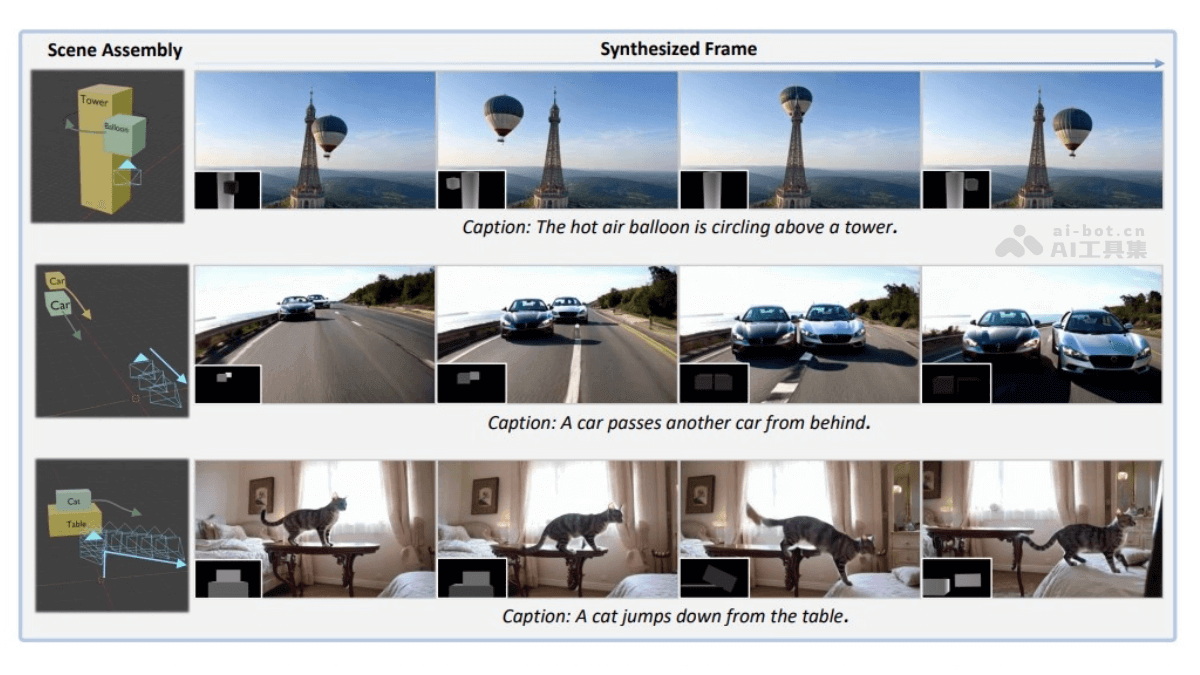
Main features of CineMaster
- 3D object and camera control: Users can freely adjust the position, size, and motion trajectory of objects in 3D space, while defining camera movement (such as translation and rotation), achieving precise scene layout and shot design.
- Interactive design and real-time preview: Through an interactive interface, users can preview the 3D layout effect in real time and gradually optimize the design until the desired visual effect is achieved, similar to storyboard design in film shooting.
- 3D-aware video generation: Based on depth maps, object labels, and camera trajectories as conditional signals, CineMaster can generate video content that accurately matches the user's design intent, supporting complex object and camera movements.
- Automated data annotation: Provides an automated pipeline to extract 3D bounding boxes and camera trajectories from ordinary videos, solving the problem of scarcity of large-scale 3D annotation data and improving the model's training effect.
- High-quality video output: Supports the generation of high-quality and diverse video content, suitable for a variety of creative scenarios, meeting professional and entertainment needs.
Technical principles of CineMaster
- Two-stage workflow
- First stage: Users define the layout of objects and cameras through a 3D interface, generating depth maps and motion trajectories as control signals.
- Second stage: The control signals are input into the diffusion model to generate videos that match the design intent.
- Semantic layout control network: Combines 3D spatial layout and semantic information, fusing depth maps and object labels through MLP to precisely guide video generation.
- Camera adapter: Injects camera pose into the generation process, distinguishes object and camera movement, and supports complex shot design.
- Automated data annotation pipeline: Uses instance segmentation, depth estimation, and 3D point cloud computation to extract 3D bounding boxes and camera trajectories from ordinary videos, providing data support for model training.
- Instance segmentation: Uses Grounding DINO and SAM 2 to obtain foreground instance segmentation results.
- Depth estimation: Uses DepthAnything V2 to generate metric depth maps.
- 3D point cloud and bounding box computation: Computes the 3D point cloud of each entity through back-projection, and calculates the 3D bounding box with the minimum volume.
- Entity tracking and 3D bounding box adjustment: Uses SpatialTracker for point tracking, computes the 3D bounding box for each frame, and renders depth maps.
- Diffusion model and training strategy: Based on pretrained diffusion models, it improves generation quality and controllability through multi-stage training (including depth map training, semantic layout training, and joint training).
CineMaster's project address
- Project official website:https://cinemaster-dev.github.io/
- arXiv technical paper:https://arxiv.org/pdf/2502.08639
CineMaster's application scenarios
- Film and television production: Used for storyboard design, special effects previews, and animation production, helping directors and creators quickly realize their ideas and improve production efficiency.
- Advertising and marketing: Create creative videos, product demonstrations, and virtual scenes to enhance advertising appeal and user experience.
- Game development: Generate cutscenes, scene design, and character animations to improve a game's narrative and visual effects.
- Education and training: Produce instructional videos, virtual experiments, and safety training content to improve teaching and training outcomes.
- Entertainment and social media: Create creative videos, virtual travel, and interactive entertainment content to enhance user participation and immersion.