
What is ChatTTS
ChatTTS is a text-to-speech (TTS) model designed specifically for dialogue scenarios and supporting both Chinese and English. Trained on approximately 100,000 hours of Chinese and English data, it can generate high-quality, natural and fluent conversational speech. ChatTTS has been optimized for conversational tasks, achieving more natural and fluent speech synthesis, while also supporting multiple speakers and possessing fine-grained control capabilities, able to predict and control prosodic features such as laughter and pauses, surpassing most open-source TTS models.
Features of ChatTTS
- Text-to-speech: ChatTTS can convert user-input text information into natural and fluent speech output in real time, suitable for various language environments.
- Multilingual support: In addition to supporting Chinese, ChatTTS can also process English text, enabling it to serve a broader user base.
- Emotion and prosody adjustment: ChatTTS can not only convert text, but also adjust the emotional tone and prosodic features of the speech according to the text content, such as speech rate, intonation, and pauses, making the speech more closely resemble the natural rhythm of real human speech.
- Voice character selection: Users can choose the most suitable voice from multiple preset voice characters according to the needs of the application scenario, increasing the personalization and expressiveness of the speech.
- Interactive Web interface: Through an intuitive Web interface, users can directly enter text in the browser and obtain speech output without writing code.
- Real-time voice interaction: ChatTTS supports real-time speech synthesis, making it very suitable for dialogue systems and interactive applications that require immediate feedback.
- Voice file export: Users can export synthesized speech as common audio file formats, facilitating subsequent editing, sharing, or use as part of multimedia content.
- Integration and compatibility: ChatTTS supports integration into various platforms and applications, and can be seamlessly integrated into Web applications, mobile applications, desktop software, and many other environments.
- Emotion tagging system: ChatTTS supports embedding emotion tags in text, allowing users to finely control the emotional expression of speech output, such as inserting a [laugh] tag in the text to simulate laughter.
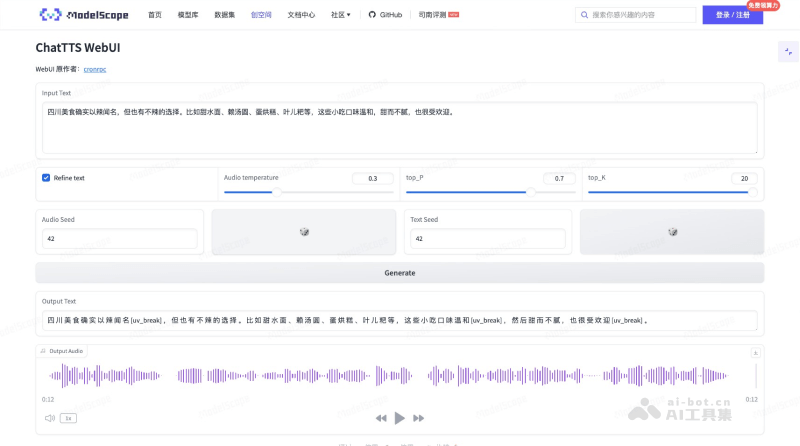
ChatTTS official website entry
- Official GitHub source code repository:https://github.com/2noise/ChatTTS
- Hugging Face model address:https://huggingface.co/2Noise/ChatTTS
- ModelScope model address:https://www.modelscope.cn/models/pzc163/chatTTS/summary
How to run ChatTTS
Method 1: Online experience Demo
Ordinary users can run the online ChatTTS WebUI Demo provided by the community on ModelScope and Hugging Face to experience it directly
- ModelScope version Demo:https://www.modelscope.cn/studios/AI-ModelScope/ChatTTS-demo/summary
- Hugging Face version Demo:https://huggingface.co/spaces/Dzkaka/ChatTTS
Method 2: Local deployment and operation
- Install environment: Make sure Python and Git are installed on your computer.
- SDK download: Install ModelScope and SDK model download
#安装ModelScope
pip install modelscope
#SDK模型下载 from modelscope import snapshot_download model_dir = snapshot_download('pzc163/chatTTS') - Get source code: Through the Git version control system, clone the ChatTTS source code from the ModelScope code repository to your local machine.
#Git模型下载 git clone https://www.modelscope.cn/pzc163/chatTTS.git - Install dependencies: Enter the project directory and use the pip command to install the required Python dependency packages.
pip install -r requirement.txt pip install Ipython pip install soundfile - Model inference: You can use the free computing power of the ModelScope community to complete model inference
from ChatTTS import Chat from IPython.display import Audio #下载模型 from modelscope import snapshot_download model_dir = snapshot_download('pzc163/chatTTS') chat = Chat() chat.load_models(source='local', local_path=model_dir) texts = ["你好,我是ChatTTS,很高兴认识大家",] wavs = chat.infer(texts, use_decoder=True) Audio(wavs[0], rate=24_000, autoplay=True) # save audio import soundfile as sf audio_data = wavs[0] if len(audio_data.shape) > 1: audio_data = audio_data.flatten() output_file = './output_audio2.wav' sf.write(output_file, audio_data, 24000) print(f"Audio saved to {output_file}") - Build WebUI and run it
git clone https://www.modelscope.cn/studios/AI-ModelScope/ChatTTS-demo.git
cd ChatTTS
pip install -r requirements.txt
python app.py
ChatTTS Application Scenarios
- Virtual Assistants and Customer Service Chatbots: ChatTTS can provide natural and fluent speech output for virtual assistants and online customer service chatbots, enhancing the user experience.
- Audiobooks and E-books: Convert text content into speech to provide voice reading functionality for audiobooks and e-books, making it convenient for users to listen while commuting or doing household chores.
- Social Media and Content Creation: On social media platforms or in content creation, ChatTTS can generate engaging voice content, increasing interactivity and fun.
- News and Podcasts: Automatically convert news articles or blog posts into speech for podcasts or news broadcasts.
- Accessibility Assistance: Provide voice assistance for visually impaired individuals or users with reading difficulties, enabling them to obtain information by listening.