
What is ChatLens
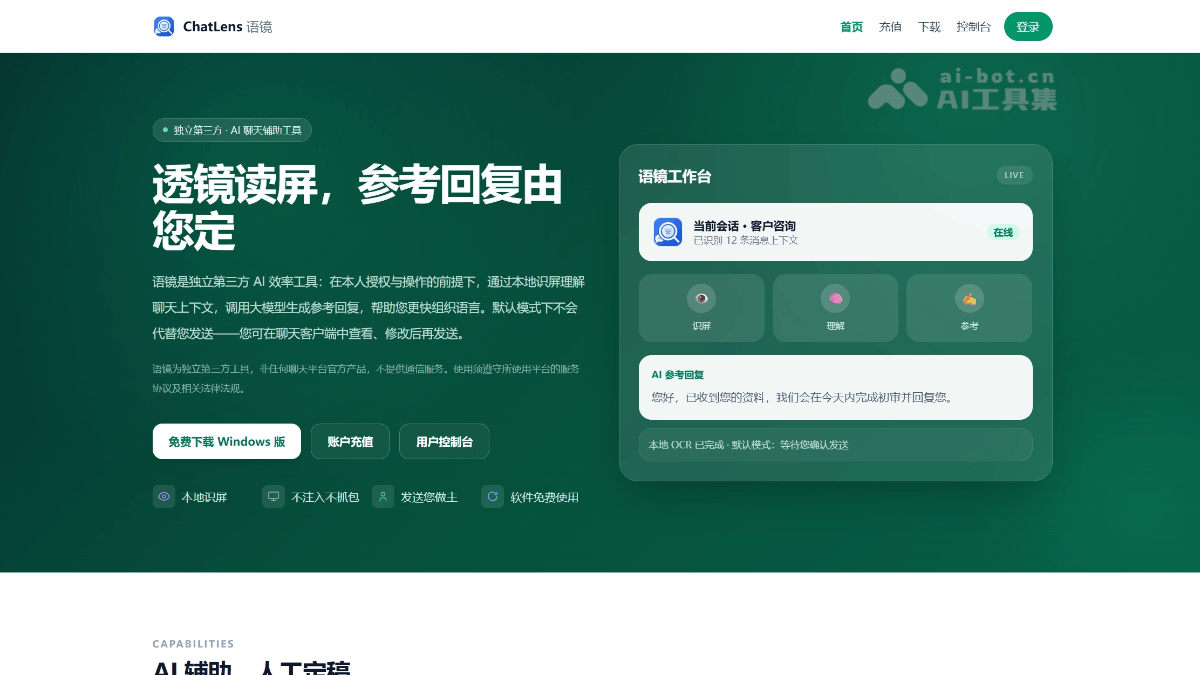
ChatLens is an independent third-party AI conversation agent that provides smart reply assistance for chat scenarios such as WeChat through pure visual technology. Based on OpenCV self-developed algorithms and local OCR, it achieves interface recognition and text extraction without hooking, packet capturing, or protocol cracking, avoiding account ban risks at the source; visual recognition is fully localized with zero token consumption, and user tokens are used only for conversation generation. The product centers on a three-layer architecture of "prompts + knowledge base + skill library," respectively solving "how to chat, what to chat about, and in what process to chat," with built-in practical skill templates for sales, after-sales, and more; combined with pure hardware-level real keyboard and mouse operations, the realism is extremely high.
Main Features of ChatLens
-
Lens Screen Reading (Local Visual Recognition): Based on an OpenCV self-developed algorithm framework, it locally analyzes the chat window layout and automatically locates the message area and input box; interface elements rely on visual recognition and chat text is extracted by local OCR, with no hooking, packet capturing, or protocol cracking, and zero token consumption for visual recognition.
-
Multi-Algorithm Fusion Decision-Making: Multiple recognition algorithms internally perform "confidence scoring" and make a final judgment based on the composite score. Changes in interface size and layout do not affect recognition accuracy, providing high stability and robustness.
-
Smart Reference Replies: Generates scenario-appropriate reference scripts by combining screen recognition context, prompts, knowledge base, and skill library; by default, users review, edit, and send in the chat client, and automatic sending is an optional capability that requires explicit authorization to enable.
-
Prompt Templates: The system comes with multi-industry reference prompt templates that can be freely modified to set persona, tone, and conversation boundaries, solving the problem of "how to chat."
-
Knowledge Base: Supports importing various materials such as Q&A, long texts, images, and files, and can configure industry-specific knowledge bases, solving the problem of "what to chat about."
-
Skill Library (Exclusive): Built in with a variety of practical templates for sales, after-sales, appointments, and more. It understands user intent in stages, knows when to advance, when to stop, and when to follow up, and can report to designated personnel at key nodes, solving the problem of "in what process to chat."
-
Contact · Conversation Context: Establishes a local profile for each contact, recording tags, follow-up status, and personalized notes, and generates more precise replies based on the current conversation context; data is stored on the local machine, and complete screen recordings are not uploaded.
-
Pure Hardware-Level Real Operations: Core mouse and keyboard actions achieve pure hardware-level real operations, saying goodbye to software-layer simulated clicks, with extremely high operational realism.
-
Multithreaded Automated Mass Messaging: Drawing on the SightFlow state machine design, it has been rewritten with multithreading and deeply optimized, supporting automated mass messaging and high-concurrency conversation processing.
-
Bring Your Own Model (BYOK): Supports connecting to OpenAI-compatible interfaces such as Volcano Engine Doubao, Alibaba Bailian, DeepSeek, and Kimi, and the backend also presets top-tier models such as GPT-5 and Gemini 3 for switching at any time.
-
Login and Use · Transparent Balance: The software is free. After logging in, select a large model and recharge in the web console, shared between the desktop client and the account; fees are deducted based on actual usage, with no time-based packages or daily message limits, and usage and recharge records can be checked in real time.
-
Human Takeover Available: Default manual review mechanism, supporting pause at any time, manual takeover, and emergency termination; the automation process is traceable and intervenable.
How to use ChatLens
-
Register an account: Visit the ChatLens official website https://chatlens.cn/, register an account, and new users can receive trial credits.
-
Download and install: Download the Windows desktop client, and after installation, log in using the registered account.
-
Select a model and top up: In the web console, select the large model you want to use (supporting mainstream models such as Doubao, Qwen, DeepSeek, Kimi, etc.) and top up. The desktop client can open the console with one click. AI generation is billed by actual usage, with no time-based packages and no message limits.
-
Configure prompts: Choose from the system's built-in multi-industry prompt templates, or modify and customize them according to your own business, setting the persona, tone, and conversation boundaries.
-
Build a knowledge base: Import business materials such as Q&A, long texts, images, and files, and configure an industry-specific knowledge base so replies are well-grounded.
-
Configure the skill library: Select skill templates such as sales, after-sales, and appointments according to business scenarios, and set phased communication strategies, key-node reporting recipients, and manual takeover rules.
-
Improve contact profiles: Add tags, follow-up status, and personalized notes for key contacts, so the agent can generate more precise replies based on customer profiles.
-
Start the screen recognition engine: Start the screen recognition engine. ChatLens automatically recognizes the chat window layout locally, extracts conversation context, and generates reference replies.
-
Review and send (default mode): In the chat client, view and modify the AI-generated reference wording, and after confirmation, send it manually yourself.
-
Enable automation as needed (optional): If you need automatic sending or automated bulk sending, explicitly authorize and enable it in settings; during use, you can pause at any time, take over manually, or terminate in case of abnormality. Usage and top-up records can be queried in real time in the console.
Core advantages of ChatLens
-
Compliant and safe, no risk of account bans: With a pure visual recognition approach, it does not hook, does not capture packets, does not crack communication protocols, and does not read encrypted databases, fundamentally avoiding the red-line risk of data-stream interception solutions, which may range from feature restrictions to account bans.
-
Zero-cost visual recognition: Interface recognition and text extraction are fully localized (OpenCV algorithms + local OCR). Compared with ordinary pure visual solutions, which cost about 2,000 tokens per session for "looking at images," this part is permanently free for ChatLens users, and tokens are spent only on the conversation content itself.
-
Multi-algorithm fusion for more stable recognition: Multiple algorithms use internal "confidence scoring" for comprehensive decision-making, replacing single-algorithm judgment. Interface zooming and layout changes do not affect accuracy, avoiding coordinate misjudgments caused by large-model hallucinations.
-
Pure hardware-level real operations: Keyboard and mouse actions implement hardware-level real triggers rather than software-layer simulated clicks. The operation behavior is indistinguishable from that of a real person, with a degree of realism far exceeding ordinary script tools.
-
Exclusive skill library architecture: The complete three-tier system of "prompt + knowledge base + skill library" fully covers "how to chat, what to chat about, and what process to follow when chatting." It comes with built-in practical templates for sales, after-sales, and more. It is not rigid question-and-answer exchanges, but an intelligent process that knows how to advance, stop, follow up, and report.
-
Free software, transparent billing: No duration packages, no daily message limit. Charges are deducted based on actual AI usage. Usage and top-up records can be checked in real time in the console, making costs fully controllable.
-
Models are flexible and not locked in: Supports mainstream models such as Doubao, Qwen, DeepSeek, and Kimi, as well as GPT-5 and Gemini 3, with switching at any time; in practice, properly configured domestic models can achieve human-like reply quality, so there is no need to pay a premium for top-tier models.
-
Data privacy, local first: Screenshots and OCR are processed locally on the device. Contact profiles, tags, and follow-up information are stored on the local machine, and full screen recordings are not uploaded.
Application scenarios of ChatLens Yujing
-
Private domain sales conversion: Sales teams use the "sales skill template" to follow up with a large number of potential customers. The agent knows when to advance, when to follow up, and when to close, and automatically reports to the person in charge at key deal-closing moments, improving private domain conversion rates.
-
E-commerce pre-sales consultation: When store customer service faces high-frequency repetitive product inquiries, it combines the product knowledge base to automatically generate professional scripts, which are sent after one-click manual review, multiplying response speed.
-
After-sales service follow-up: Use the "after-sales skill template" to handle scenarios such as returns and exchanges, usage guidance, and complaint appeasement. It understands customer emotions and intentions in stages, and complex issues are automatically transferred to human takeover.
-
Appointment and order reminders: Suitable for appointment confirmation, store visit reminders, and order progress notifications in service industries such as beauty, healthcare, and education, reaching customers in a timely manner without omissions.
-
Community and mass messaging operations: Relying on multithreaded concurrency capabilities, it executes compliant automated mass messaging and parallel replies across multiple conversations, supporting daily operations at a private domain scale of tens of thousands.
-
Education and training enrollment: When course consultants follow up with prospective students, they combine tags and follow-up status in contact profiles to generate personalized course recommendations and Q&A replies.