
What is Buzzy AI
Buzzy AI is an AI video editor generative video creation platform, centered on the "Vibe Video Photoshop" concept. Users do not need professional editing skills; they can edit, enhance, or regenerate videos simply through natural language conversation. The platform's core capabilities cover Photoshop-level fine video editing (light tuning, clothes swap, background replacement, camera movement) as well as prompt-free intelligent video reconstruction, simplifying complex video post-production into a chat-style interactive experience.
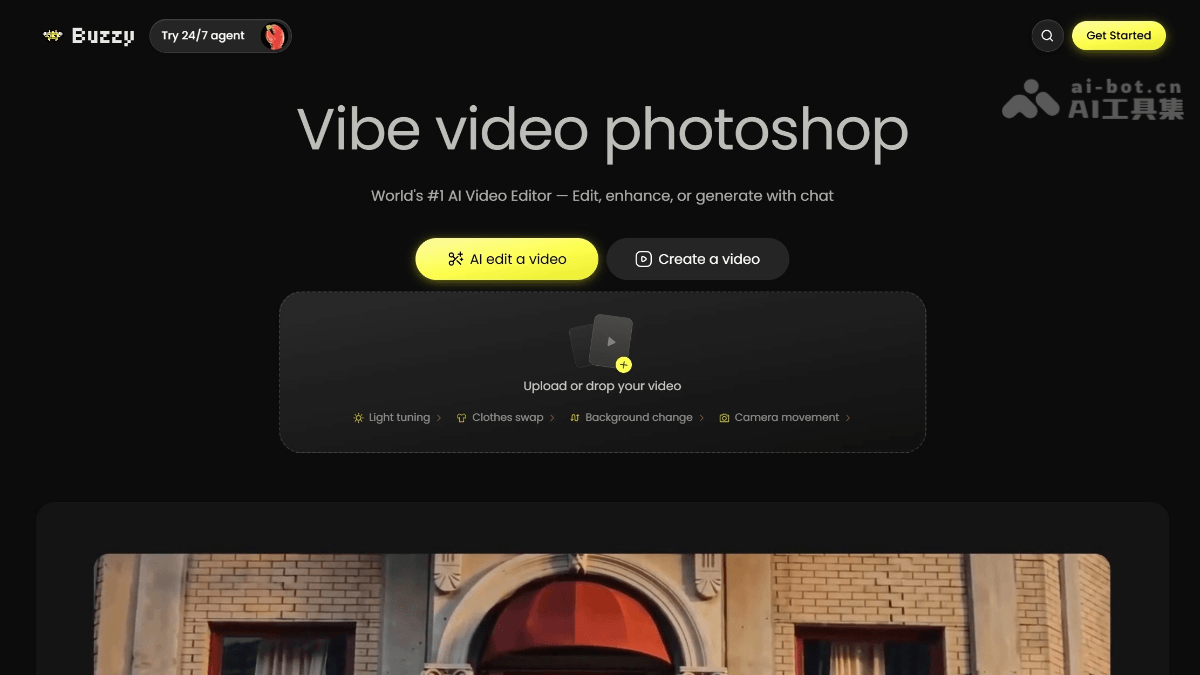
Buzzy AI's Main Features
-
Conversational Video Editing: Complete video editing, enhancement, or generation through natural language chat instructions, with no need to learn the operating logic of professional editing software.
-
Photoshop-Level Fine Editing: Supports pixel-level video adjustments such as Light tuning, Clothes swap, Background change, and Camera movement.
-
Prompt-Free Video Reconstruction: After uploading a reference video, AI automatically understands the visual content and regenerates stylized or scene-based variants, with no need for users to write complex prompts.
-
Multi-Style Video Generation: Supports video output in multiple visual styles, from realistic photography to surreal art, adapting to content needs on different platforms.
How to Use Buzzy AI
-
Visit the Platform: Open Buzzy AI's official website https://www.buzzy.now/,注册并登录账号进入主界面。
-
Upload Material: Click the upload area, drag or select a local video file to import, supporting direct processing of existing video materials.
-
Conversational Editing: Enter natural language instructions in the chat box, such as "brighten the lighting in the scene," "change the person into a suit," "change the background to a beach," "pan the camera to the left," etc., and AI automatically performs the corresponding editing operations.
-
Prompt-Free Reconstruction: If you need to completely regenerate a video, simply upload a reference video and select reconstruction mode. AI automatically understands the visual content and outputs stylized variants, with no need to manually write a prompt.
-
Preview and Adjust: View the AI-processed video effect in real time, and continue fine-tuning details through multiple rounds of conversation until the desired effect is achieved.
-
Export the Finished Product: After confirming the final effect, directly download or share the generated video file for social media, advertising placement, or brand content publishing.
Key Information and Usage Requirements of Buzzy AI
-
Product Positioning: The world's first AI video editor, centered on the "Vibe Video Photoshop" concept, completing video editing, enhancement, and generation through natural language conversation.
-
Core Capabilities: Supports Photoshop-level fine editing such as light tuning, clothes swap, background replacement, and camera movement, as well as prompt-free intelligent video reconstruction.
-
Interaction Method: Entirely based on chat conversation; users input natural language instructions to drive AI in performing complex video post-production operations.
-
Target Scenarios: Social media content, e-commerce product videos, advertising creative iteration, personal IP content, brand visual consistency.
-
Material Requirements: Supports uploading local videos as source material for editing or reconstruction; specific format and size limits are not clearly published on the official website.
-
Network Environment: As an online SaaS platform, it requires a stable network connection, and all video processing is completed in the cloud.
Buzzy AI's Core Advantages
-
Zero-Threshold Interaction: The conversational interface completely eliminates the learning curve of professional video software, enabling non-technical users to produce high-quality videos.
-
Editing-Level Precision: Unlike purely generative tools, Buzzy AI focuses on fine-grained editing of existing videos, preserving the core value of the original footage.
-
End-to-End Reconstruction Capability: It enables intelligent re-creation based on a reference video without prompts, greatly reducing the cost of creative trial and error.
-
Real-Time Visual Feedback: The official website showcases numerous high-quality example videos covering people, products, scenes, and more, demonstrating its commercial-grade output capability.
Comparison of Buzzy AI with Similar Competitors
| Comparison Dimension | Buzzy AI | Runway Gen-4 | Pika 2.5 |
|---|---|---|---|
| Core Positioning | AI Video Editor (Conversational) | Professional-Grade AI Video Generation and Editing Platform | Lightweight Short Video Generation Tool |
| Interaction Method | Natural Language Conversational Editing | Traditional Interface + Parameter Controls | Text/Image Prompt Generation |
| Editing Capabilities | Pixel-Level Adjustments for Lighting, Outfit Changes, Backgrounds, Camera Movement, etc. | Green Screen Removal, Object Erasure, Motion Brush, Multi-Track Timeline | Basic Video Modification, with Regeneration as the Main Approach |
| Generation Method | Prompt-Free Reconstruction from Reference Video | Text/Image Generation, Supports Act-Two Motion Capture | Text/Image Generation, Pikaframes Two-Frame Transition |
| Maximum Duration | Not specified (examples are mainly short clips) | 16 seconds/clip | 10 seconds/clip |
| Output Resolution | Not specified (example quality is relatively high) | Up to 4K Export | 1080p (Paid Plans) |
| Target Users | Content Creators, Marketers, Designers | Filmmakers, VFX Artists, Professional Studios | Social Media Creators, Marketing Teams |
Buzzy AI's Application Scenarios
-
E-Commerce Product Videos: Quickly adjust the lighting and background of product showcase videos, and generate multiple versions for distribution across different channels.
-
Social Media Content: Create stylized short videos for TikTok, Instagram Reels, and YouTube Shorts, with support for outfit changes and scene reconstruction.
-
Advertising Creative Iteration: Quickly generate multiple creative variants from existing materials through conversational instructions, accelerating the A/B testing process.
-
Personal IP Content: Creators can improve video quality through chat-based editing without a professional team, achieving effects such as one-click outfit changes and background replacement.
-
Brand Visual Consistency: Apply consistent lighting adjustments and stylized processing to batches of videos, maintaining a unified brand visual tone.