
What is Bing Video Creator
Bing Video Creator is launched by MicrosoftAI video generation tool. Powered by OpenAI's Sora model, it can quickly generate video content based on text descriptions entered by users. Users only need to enter detailed scene descriptions in the Bing mobile app, including information such as subject, action, and environment, and the system will generate the corresponding video in a short time. The videos generated by the tool are 5 seconds long, support 9:16 format, can be used for free, and initially include 10 fast generation opportunities.
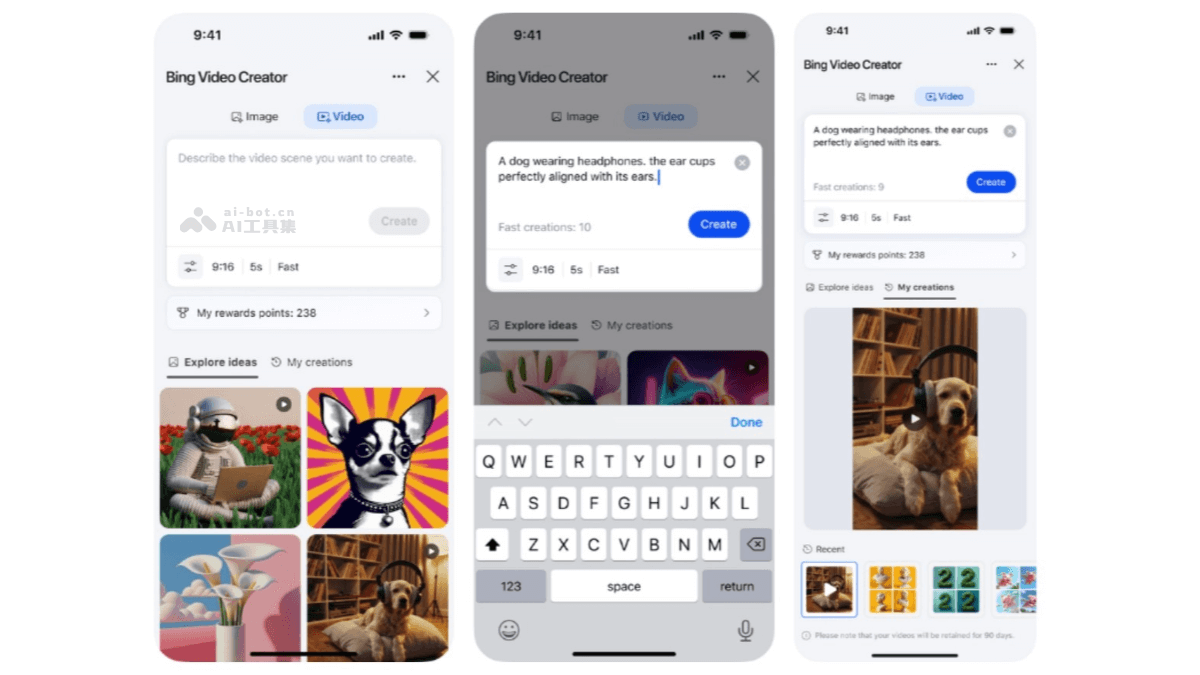
Main features of Bing Video Creator
- Video generation: Users enter detailed text descriptions, and the system automatically generates the corresponding short video. It can generate videos in various styles such as realistic, landscape, cartoon, and film/TV.
- Fast mode: Initially provides 10 free fast generation opportunities. After they are used up, 100 Microsoft Rewards points can be consumed to continue using it.
- Standard mode: Unlimited times, but the generation speed is slower.
- Video duration and format: Currently the generated videos are 5 seconds long and support 9:16 format.
- Generation quantity limit: Users can queue up to three videos for generation at the same time.
- Video storage time: Completed videos will be stored in the user's account for 90 days.
How to use Bing Video Creator
- Open the app: You need to first download and install the Bing mobile app.
- Enter Video Creator: After opening the Bing app, tap the menu button in the lower right corner and select "Video Creator", or directly enter "Create a video of..." in the search bar.
- Enter a description: Enter a detailed text description in Video Creator, including details such as scene, subject, and action. The more detailed the description, the more the generated video meets the requirements.
- Generate video: After submitting the description, Bing Video Creator will use the Sora model to process the request and notify the user when completed.
- Share or download: After the video is generated, users can choose to download it, share it via email or social media, or copy the direct link to the video.
- Notes
- Language limitation: Currently the tool may not support Chinese prompts, and Chinese prompts may cause errors or no response.
- Post-processing: Generated videos do not include subtitles or voiceover, and users need to add them themselves.
Bing Video Creator official website address
- Official website address:Bing-Video-Creator
- Apple AppStore:https://apps.apple.com/us/app/microsoft-bing-search
- GooglePlay:https://play.google.com/store/apps/details?id=com.microsoft.bing
Application scenarios of Bing Video Creator
- Advertising video production: Enterprises can use Bing Video Creator to quickly generate product promotional videos or advertising materials.
- Teaching video production: Teachers can generate videos for teaching, such as "the process of plant photosynthesis" or "reenactment of historical events", to help students understand complex concepts more intuitively and enhance learning interest.
- Online course content: Online education platforms can use the tool to generate course videos, enrich course content, and improve the course's appeal and teaching quality.
- Creative video production: Artists, designers, and creative professionals can use Bing Video Creator to generate unique creative videos for art projects, animation production, and more, sparking creative inspiration.
- Personal Entertainment: Users can generate fun videos, such as "a fantastical journey of themselves in space" or "interactions with virtual characters," for personal entertainment and sharing.