
What is Awesome MCP Servers
Awesome MCP Servers is an open-source project that brings together various servers based on the Model Context Protocol (MCP). Awesome MCP Servers organizes over 3000 MCP servers, covering more than 20 vertical domains such as browser automation, finance, gaming, security, and scientific research, and supports both local and cloud service deployment. MCP servers primarily provide AI large models with rich external data access and tool invocation capabilities. Awesome MCP Servers provides developers with abundant resources, promoting the standardization and convenience of interaction between AI and external systems.
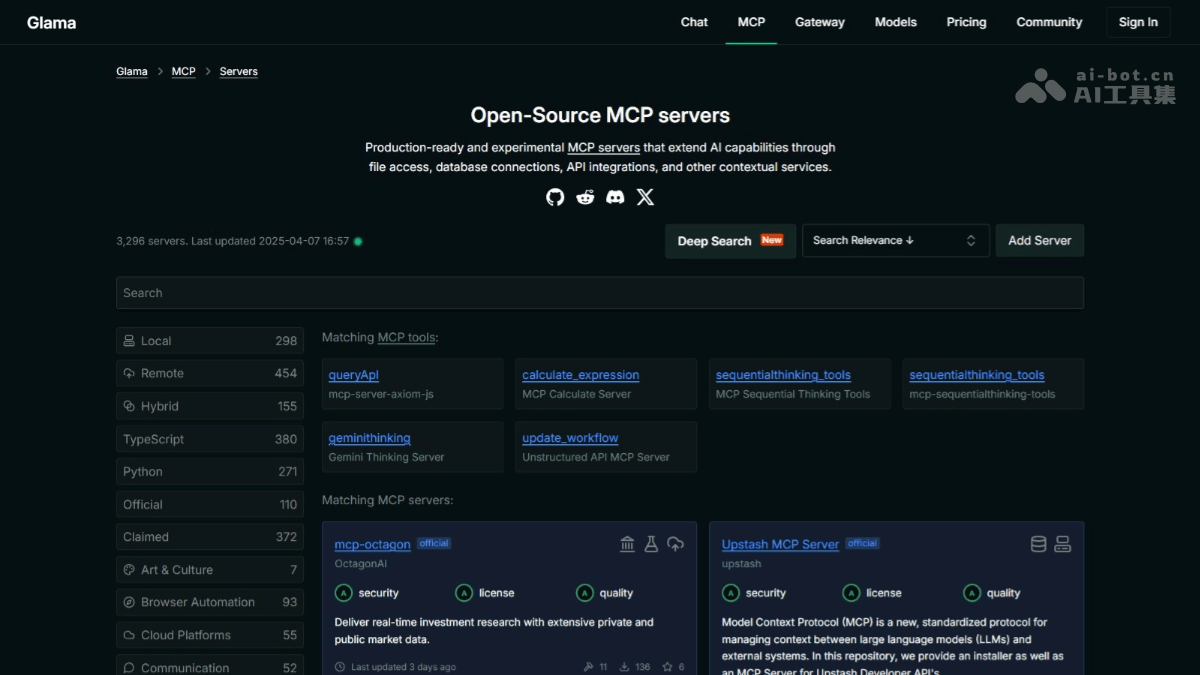
Main features of Awesome MCP Servers
- Resource integration: Based on the MCP protocol, it enables AI models to connect to various external resources, such as file systems, databases, cloud services, etc., extending functionality.
- Multi-domain support: Covers multiple domains such as browser automation, finance, gaming, security, and scientific research, providing abundant server implementations.
- Development support: Supports multiple programming languages (such as Python, TypeScript, Go, etc.), and provides development frameworks (such as FastMCP) and tools to simplify the development process.
- Community and ecosystem: Provides community support based on platforms such as GitHub, Discord, and Reddit, along with detailed tutorials and documentation to help developers get started quickly.
Some MCPs of Awesome MCP Servers
- Browser automation: MCP-Playwright provides browser automation capabilities, allowing AI large models to navigate web pages, perform click/input operations, capture screenshots, and run JavaScript in a real browser environment.
- Manage Notion: notion_mcp connects AI large models with the Notion platform, supporting automated page management, content synchronization, template generation, etc.
- Finance: coinmarket-mcp-server retrieves cryptocurrency market data based on the Coinmarket API, including price, market capitalization, trading volume, etc.
- Gaming: mcp-unity provides integration for the Unity3D game engine, supporting functions such as editing, running, debugging, and scene management in game development.
- Search : arxiv-mcp-server supports AI models in searching papers in the arXiv academic paper repository based on programming interfaces, downloading content, and conducting in-depth analysis (such as abstract extraction, method evaluation, and result interpretation), while also supporting local storage to accelerate access.
- Security: dnstwist MCP Server detects security issues such as domain typosquatting and phishing websites based on the dnstwist tool.
- Location services: mcp-server-google-maps integrates Google Maps services, providing location services, route planning, and place details queries.
- Version control : mcp-server-git directly operates Git repositories, including reading, searching, and analyzing local repositories.
- Social: vrchat-mcp is an MCP server that interacts with the VRChat API, supporting retrieval of information such as VRChat friends, worlds, and avatars.
How to use Awesome MCP Servers
- Choose a suitable MCP server:
- Browse the Awesome MCP Servers list: Visit the GitHub repositoryof Awesome MCP Servers. Browse MCP server implementations in different categories. Choose a suitable server according to your needs.
- View detailed information about the server: Click the link to the server you are interested in to enter the GitHub repository address. Read the README.md file to learn about the server's features, installation steps, usage, and example code. Check the server's badges (such as programming language, deployment environment, supported operating systems, etc.) to ensure it matches your tech stack and deployment needs.
- Install and Configure the MCP Server:
- Clone the Repository: In your local development environment, clone the GitHub repository of the chosen MCP server. For example:
git clone https://github.com/executeautomation/mcp-playwright.git
cd mcp-playwright-
- Install Dependencies: Follow the
README.mdfile instructions to install the required dependencies. For example, formcp-playwright:
- Install Dependencies: Follow the
npm install-
- Configure the Server: If needed, configure the server's parameters, such as API keys for connecting to external services, database addresses, etc.
- Start the MCP Server:
- Run the Server: Follow the
README.mdfile instructions to start the MCP server. For example:
- Run the Server: Follow the
npm start-
- Verify the Server's Running Status:
- Visit the server's documentation page (usually at
localhost:8080/docs) to view the API documentation and example requests. - Send a test request to ensure the server is running properly.
- Visit the server's documentation page (usually at
- Verify the Server's Running Status:
- Integrate into an AI Model or Application:
- Choose a Client Tool: Choose a client tool suitable for the AI model or application you are using.
- Install the Client Tool:
npm install @mcp-langchain-ts-client-
- Write Integration Code:In the AI model or application, write code to call the MCP server.
import { MCPClient } from '@mcp-langchain-ts-client';

const client = new MCPClient('http://localhost:8080');

async function fetchData() {
  const result = await client.call('playwright.fetch', {
    url: 'https://example.com',
    action: 'click',
    selector: '#some-button',
  });
  console.log(result);
}

fetchData();-
- Test and Debug:Run the code to ensure the AI model can successfully call external resources through the MCP server. Adjust the code and server configuration as needed to optimize performance and functionality.
Project Address of Awesome MCP Servers
- Project Official Website:https://glama.ai/mcp/servers
- GitHub Repository:https://github.com/punkpeye/awesome-mcp-servers
Application Scenarios of Awesome MCP Servers
- Automated Tasks: Based on browser automation tools, automatically complete tasks such as web navigation and data scraping to improve work efficiency.
- Financial Data: Based on MCP servers in the financial field, AI obtains real-time financial market data to assist investment decisions.
- Game Development: In game development, use MCP servers to integrate with game engines, with AI assisting in designing, testing, and optimizing games.
- Security Detection: Based on MCP servers in the security field (such as mcp-dnstwist), AI detects domain typosquatting and phishing websites to enhance cybersecurity.
- Scientific Research: In the scientific research field, use MCP servers to connect to academic paper databases, with AI quickly searching and analyzing academic papers to accelerate the research process.