
What is Automa
Automa is a low-code/no-code browser automation tool that helps users automate complex web tasks through simple operations. It supports recording user actions or manually editing workflows, and can automatically complete web data scraping, form filling, screenshots, scheduled tasks, and more. Users do not need programming knowledge and can build and run automation processes through a visual interface. Automa supports Chrome and Firefox browsers, providing a rich set of modules and flexible configuration options to meet the needs of different scenarios.
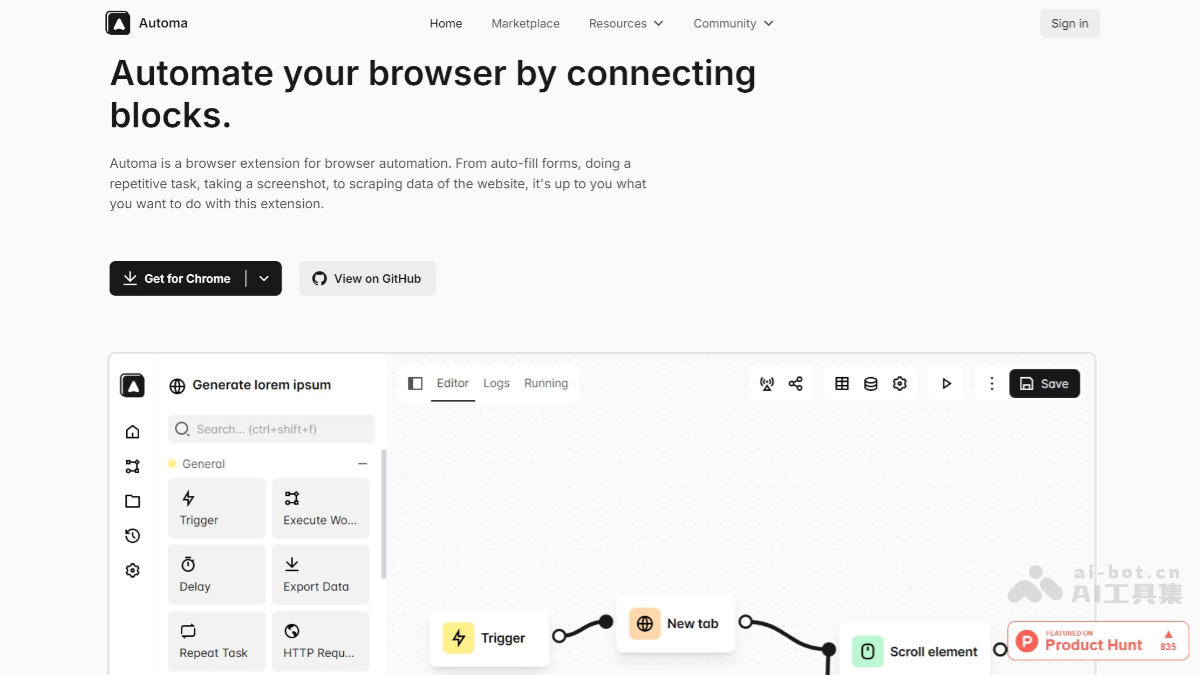
Main features of Automa
- Web automation operations: Automa can automatically perform various operations on web pages, such as clicking buttons, filling out forms, scrolling pages, entering text, and more. Users can achieve these functions by recording actions or manually editing workflows, without writing code.
- Data scraping and export: Users can use Automa to extract data from web pages (such as text, tables, images, etc.) and export it to formats such as CSV and JSON. Data can also be inserted directly into Google Sheets for convenient subsequent processing and analysis.
- Workflow recording and editing: Automa provides a visual workflow editor. Users can automatically generate workflows by recording their own actions, or manually add and connect modules to build complex automation processes.
- Task scheduling and triggering: Users can set trigger conditions for workflows, such as running on a schedule, running when visiting a specific website, running when receiving a specific email, etc., enabling flexible scheduling of automated tasks.
- Workflow sharing and reuse: Automa has a workflow marketplace where users can obtain workflows shared by other users, customize and reuse them according to their own needs, and reduce learning and development costs.
- Screenshots and recording: Automa supports taking screenshots or recording videos of web pages, making it convenient for users to save web page states or generate operation demonstrations.
- Multi-browser support: Currently, Automa supports Chrome and Firefox browsers. Users can install the extension in these browsers to quickly start and run automated tasks.
- Logs and history: Automa records workflow run logs. Users can view historical execution records, making it convenient to debug and optimize workflows.
- Integration with third-party services: Automa supports integration with third-party services such as Google Sheets, Slack, and Telegram, enabling functions such as data synchronization and automated notifications.
How to use Automa
- Install the extension: Visit Automa'sofficial websiteto install the extension. Automa supports Chrome and Firefox browsers. Or go to the browser's extension store (such as the Chrome Web Store or Firefox Add-ons), search for "Automa", find the corresponding extension, and install it.
- Create and edit workflows: After installation is complete, open the Automa extension:
- Record actions: Click the "Record" button to start recording your actions (such as clicks, input, scrolling, etc.). After completion, Automa will automatically generate a workflow.
- Manual editing: You can also choose to create it manually by dragging modules (such as "Click Button", "Input Text", "Extract Data", etc.) onto the workflow canvas and connecting the modules to build an automation process.
- Configure trigger conditions: Set the conditions for the workflow to run, for example:
- Manual run: Click the play button to run the workflow directly.
- Scheduled run: Set a scheduled task, for example, to run automatically every day.
- Triggered run: Run automatically when a specific webpage is visited or a specific email is received.
- Run the workflow: After saving the workflow, click the "Run" button to execute the automation task. During the run, Automa will automatically operate the browser according to the configured steps.
- View logs and results: After the run is complete, Automa will record the run logs and results. Users can view the execution status or export data (such as scraped webpage content).
- Share and reuse workflows: If needed, you can save the workflow to the Automa workflow marketplace to share it with other users; you can also obtain workflows shared by others from the marketplace and use or modify them directly.
Automa use cases
- Data collection: Batch scrape webpage data, suitable for scenarios such as market research and competitor analysis.
- Office automation: Automatically fill out forms, process emails, etc., improving work efficiency.
- Personal task management: Set scheduled tasks, such as automatic backup and scheduled page refresh.