
What is AnyText
AnyText is a diffusion-based multilingual visual text generation and editing model launched by the team at Alibaba's Intelligent Computing Research Institute, focusing on rendering accurate and coherent text in images. AnyText includes two main elements in its diffusion pipeline: the auxiliary latent module and the text embedding module. The former uses inputs such as text glyphs, positions, and masked images to generate latent features for text generation or editing. The latter uses an OCR model to encode stroke data, and these encodings are combined with image caption embeddings from a tokenizer to generate text that blends seamlessly with the background. This technology addresses the challenge of synthesized text being blurry, unreadable, or incorrect when generating text regions in images, improving the accuracy of text writing in images.

GitHub project:https://github.com/tyxsspa/AnyText
Paper address:https://arxiv.org/abs/2311.03054
ModelScope:https://modelscope.cn/studios/damo/studio_anytext
Hugging Face:https://huggingface.co/spaces/modelscope/AnyText
AnyText's functional features
- Multilingual support:AnyText can generate text in multiple languages, including Chinese, English, Japanese, Korean, etc.
- Multi-line text generation:Users can specify text to be generated in multiple positions in an image.
- Writing in deformed regions:AnyTextIt can generate text within horizontal, vertical, and even curved or irregular regions.
- Text editing capability:AnyTextIt provides the ability to modify the text content at specified positions in an image while maintaining consistency with the style of the surrounding text.
- Plug and play:AnyText can be seamlessly integrated into existing diffusion models to provide text generation capability.
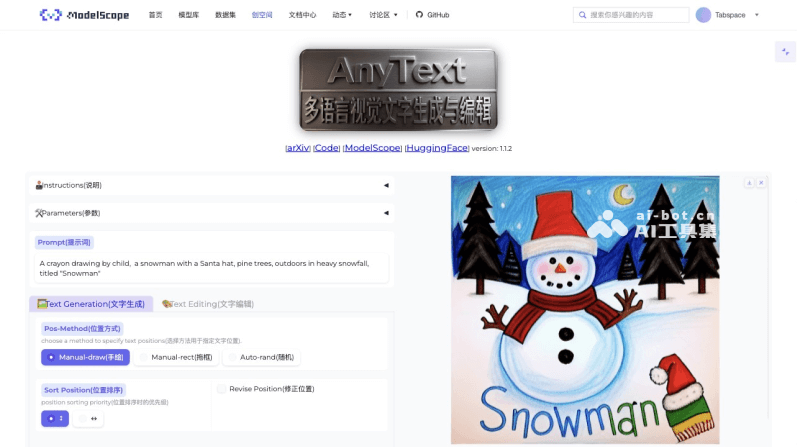
How AnyText works
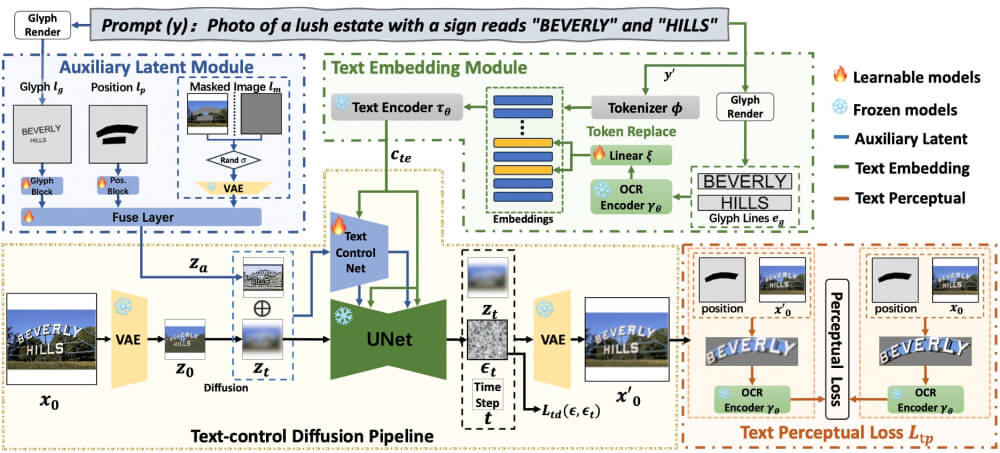
Through the collaborative work of the following modules, AnyText can accurately generate and edit multilingual text in images while maintaining seamless blending with the background, as follows:
- Text control diffusion pipeline:
- AnyText uses a variational autoencoder (VAE) to encode the input image and generate a latent representation.
- Then, through a diffusion algorithm, noise is gradually added to this latent representation to generate a series of noisy latent images at timesteps.
- At each timestep, AnyText applies a network (TextControlNet) to predict the noise that should be added to the noisy latent image in order to control text generation.
- Auxiliary latent module:
- This module takes text glyphs, positions, and masked images as input and generates an auxiliary latent feature map.
- Glyph information is generated by rendering text onto an image, position information marks the location of text in the image, and the mask image indicates the image regions that should be preserved during the diffusion process.
- Text embedding module:
- This module uses a pretrained OCR model (such as PP-OCRv3) to extract stroke information from text and encode it into embeddings.
- These embeddings are combined with image caption embeddings from a tokenizer to generate a fused intermediate representation, which is then mapped to the middle layers of the UNet through a cross-attention mechanism.
- Text perceptual loss:
- During training, AnyText uses text perceptual loss to further improve the accuracy of text generation.
- This loss is implemented by comparing the text regions in the generated image and the original image, focusing only on the correctness of the text itself and excluding factors such as the background, character position deviation, color, or font style.
- Training and Optimization:
- AnyText's training objective is to minimize the weighted sum of the text control diffusion loss and the text perception loss.
- During training, the model balances these two losses by adjusting the weight ratio (λ).
How to Use AnyText to Generate Text
- Visit AnyText'sModelScope SpaceorHugging Face demo
- Enter the Prompt text, then select the specified text position
- Finally, click Run to execute and wait for the image and text to be generated.