
What is AI速搭
AI速搭 is a low-code development platform launched by Baidu AI Cloud, helping enterprises quickly build and deploy intelligent applications. Based on the capabilities of AI technology, users can operate through a visual interface without writing a large amount of code, and can quicklybuild applications. The platform supports functions such as creating applications through dialogue, modifying entities, generating page components and reports, and has built-in multiple AI capability engines, such as Wenxin Yiyan, face recognition, OCR text recognition, etc., enabling deep integration of AI and applications. AI速搭 supports direct connection to external databases for data add, delete, modify, and query operations, and has API integration capabilities to connect to external interfaces.
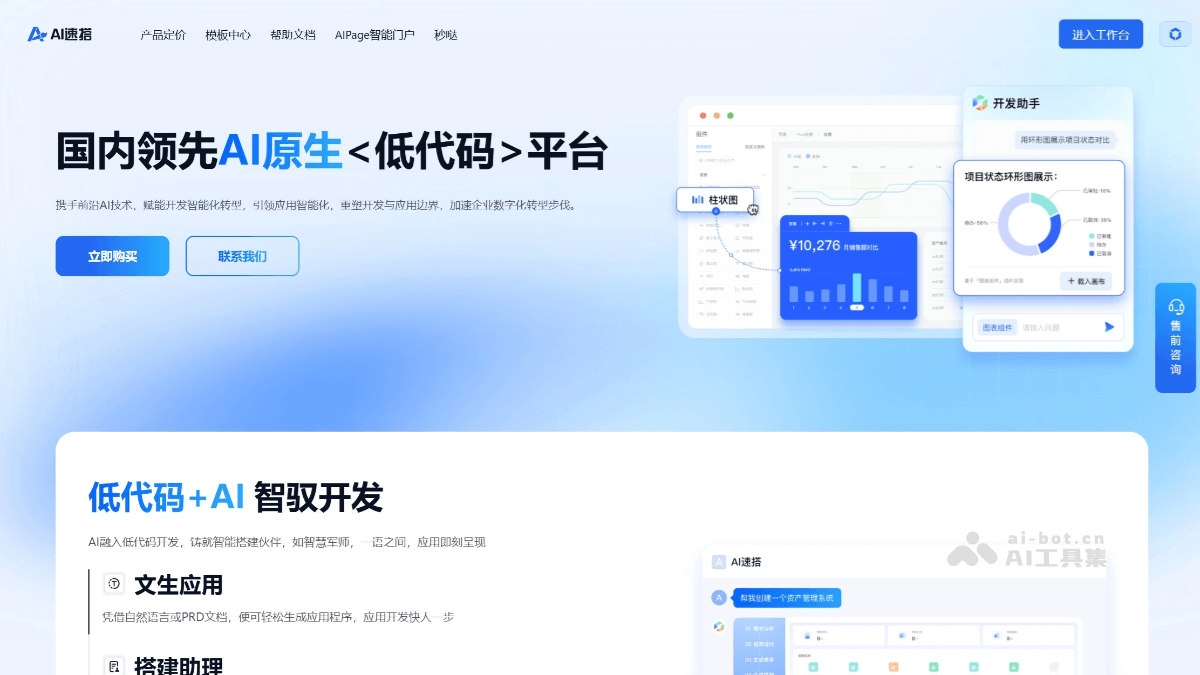
Main functions of AI速搭
- Low-code application construction: By dragging and dropping components and configuring parameters, users can quickly build application interfaces and functional modules without writing complex code.
- Rapid application generation: Supports creating applications through conversational interaction. Users can describe requirements in natural language, and AI速搭 automatically parses and generates the corresponding application framework.
- Built-in AI engines: Integrates multiple AI capabilities, such as Wenxin Yiyan, face recognition, OCR text recognition, intelligent customer service, etc. Users can directly call these AI capabilities to implement intelligent functions.
- AI connectors: Supports free configuration of AI capabilities to deeply integrate AI functions with application logic, for example, integrating OCR recognition functions in document processing applications, or integrating intelligent question-answering functions in customer service systems.
- Data model management: Supports creating and managing data models. Users can define data structures, field types, etc., to implement data storage and management.
- External database connection: Supports direct connection to external databases to implement data add, delete, modify, and query operations, making it convenient for users to integrate existing data into newly developed applications.
- API integration: Provides API interface integration capabilities. Users can integrate the functions of external services or third-party applications into their own applications to achieve richer function expansion.
- Visual backend logic editing: Supports editing backend logic through a visual interface. Users can implement complex business logic by dragging and dropping components and setting process nodes.
- Process control: Supports parallel and serial calls, as well as process control functions such as loops and branch control, meeting the needs of complex business processes.
- Personalized customization: Users can customize components according to needs and extend the platform's functions. Supports customizing application themes and styles to meet enterprise branding needs.
- Frontend project export: Supports exporting developed frontend projects, making it convenient for users to further customize and optimize
How to use AI速搭
- Registration and login: Visit AI速搭'sofficial website, register and log in to a Baidu AI Cloud account.
- Create a project: On the homepage of the 爱速搭 platform, click the "Create Project" button. Enter the project name, select the project type (such as Web application, mini program, etc.), and set the basic information of the project. Click "Confirm" to complete project creation.
- Design the application interface
- Enter the project design page: After creating a project, enter the project design interface, which provides a rich component library.
- Drag and drop components: Drag the required components (such as text boxes, buttons, tables, etc.) from the component library onto the design canvas.
- Configure component properties: After clicking a component, configure its style, data binding, and other properties in the properties panel on the right.
- Layout adjustment: Complete the interface layout design by dragging and adjusting the positions of components.
- Configure data models
- Create a data model: In project settings, click the "Data Model" option to create a new data model.
- Define fields: Add fields to the data model and set the field types (such as text, number, date, etc.).
- Associate data: If needed, you can associate the data model with an external database or API to enable dynamic reading and updating of data.
- Integrate AI capabilities
- Select AI capabilities: In the project, click the "AI Connector" option and select the AI capabilities to integrate, such as ERNIE Bot, face recognition, etc.
- Configure AI parameters: Configure related parameters according to the requirements of the selected AI capability, such as API keys, call addresses, etc.
- Bind to components: Bind AI capabilities to specific components, for example, bind OCR recognition capability to the button for uploading images to implement image text recognition.
- Write business logic
- Visual logic editing: Click the "Business Logic" option to enter the visual logic editing interface.
- Drag and drop logic nodes: Build business processes by dragging and dropping logic nodes (such as conditional judgment, loops, API calls, etc.).
- Set logic rules: Set specific rules and conditions in logic nodes to implement complex business logic.
- Preview and debug
- Preview the application: After completing the design, click the "Preview" button to view the actual effect of the application.
- Debugging features: In preview mode, you can test the various functions of the application and check for logic errors or interface issues.
- Modify and optimize: Based on the preview results, return to the design page to modify and optimize until the application meets requirements.
- Publish the application
- Configure publishing parameters: In project settings, click the "Publish" option to configure publishing parameters, such as domain name, server address, etc.
- One-click publish: Click the "Publish" button to deploy the application to the server.
- Application launch: After publishing is complete, users can access the application through the configured domain name or link.
AI速搭 product pricing
- Personal Lite Edition: Starting at 298 yuan/year. Includes entity modeling, API center, process engine, page design, report design, environment variables, and 100 intelligent sessions.
- Standard Edition: From 1680 yuan/year. Includes entity modeling, API center, process engine, page design, report design, environment variables, and 300 intelligent sessions.
- Professional Edition: From 3380 yuan/year. Includes entity modeling, API center, process engine, page design, report design, environment variables, 500 intelligent sessions, application portal, and custom components.
- Hybrid Cloud Edition: From 20000 yuan/year. Includes entity modeling, API center, process engine, page design, report design, environment variables, 1000 intelligent sessions, application portal, and custom components.
Application scenarios of AI Speed Build
- Content Creation: Supports generating copy, scripts, and other content, helping content creators quickly produce high-quality works.
- Intelligent Customer Service: Provides functions such as intelligent Q&A and automatic replies, improving customer service efficiency and user experience.
- Data Analysis: Supports functions such as data visualization and report generation, helping enterprises quickly conduct data analysis and decision-making.
- Document Processing: Supports functions such as document proofreading and content extraction, improving document processing efficiency.
- Identity Verification: Through technologies such as facial recognition, it is applied to identity verification scenarios in industries such as finance and security.