
What is AIEditor
AIEditor is a next-generation rich text editor for AI. AIEditor is developed based on Web Component and supports almost any front-end framework such as Layui, Vue, React, Angular, Svelte, etc. AIEditor is adapted for PC Web and mobile, and provides two themes: light and dark. AIEditor also provides flexible configuration, allowing developers to conveniently develop any text editing application.
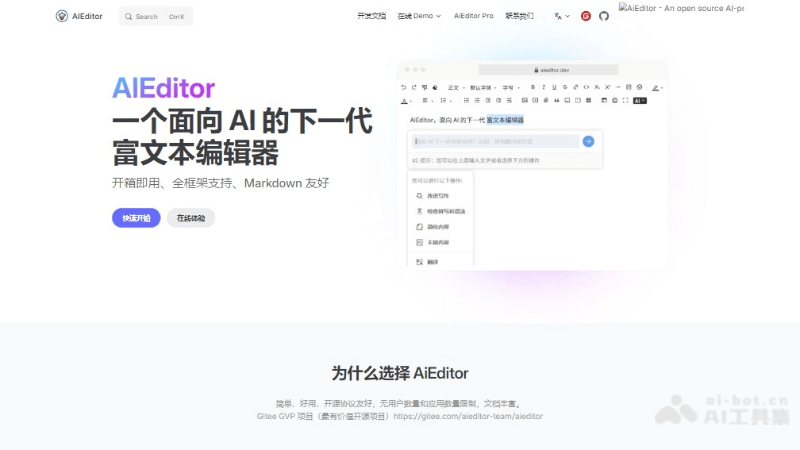
Main Features of AIEditor
- AI Feature Integration: AIEditor provides a series of AI features, including but not limited to:
- Spelling and grammar error checking.
- Text expansion, which can expand short text into longer content.
- Text compression, which reduces long text into a more concise version.
- One-click translation, conveniently translating text into different languages.
- Content summarization, quickly extracting the core points of text.
- Markdown Support: AIEditor can recognize and correctly render basic Markdown syntax and display the results in real time.
- Real-time Collaboration: Supports multiple people working on the same document simultaneously, and you can see other collaborators' input and changes in real time.
- Comment Feature: Supports reviewers adding comments or suggestions to specific parts of a document, marking issues or areas that need improvement.
- Integration of Multiple Tools: AIEditor integrates excellent open-source tools such as virtual whiteboards, hand-drawn sketches, and chart editors, enhancing the editor's functionality.
Technical Principles of AIEditor
- Web Components: AIEditor is developed based on Web Components technology, a front-end technology that allows developers to create reusable custom elements (i.e., Web Components). These components are encapsulated, can run independently of other HTML code, and can be used with any front-end framework or library.
- Custom Elements: Web Components allow developers to define their own HTML tags, and AIEditor is implemented in this way. AIEditor can be seamlessly integrated into different projects and frameworks.
- Shadow DOM: A key feature of Web Components is Shadow DOM, which provides a way to encapsulate HTML structure, CSS styles, and JavaScript inside a component, preventing conflicts with other code on the page.
- AI Integration: AIEditor integrates AI features, involving interaction with external AI services or models. The editor may use APIs to communicate with these services to implement text analysis, translation, summarization, and other functions.
AIEditor Project Address
- Project Official Website:aieditor.dev/zh
- GitHub Repository:https://github.com/aieditor-team/aieditor
How to Use AIEditor
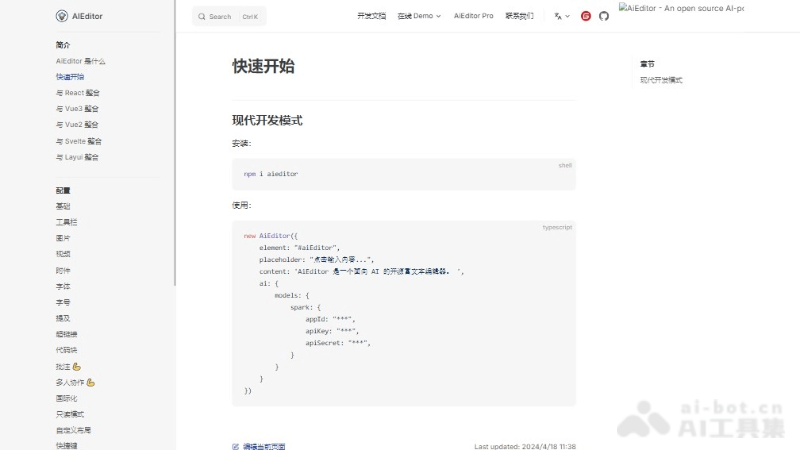
- Install AIEditor:If using npm, you can install AIEditor by running the command.
- Import AIEditor:In the JavaScript file, import AIEditor.
- Prepare the HTML Page:In the HTML file, add an element as the container for AIEditor.
- Initialize the AIEditor Instance:In the JavaScript file, create an AIEditor instance and configure it.
- Configure the AI Model(if needed):If you want to use AIEditor's AI features, you need to configure the API information of the AI model.
- Using the AIEditor API:AIEditorProvides a series of API methods through which you can interact with the editor, such as getting editor content, setting content, listening for events, etc.
AIEditor Use Cases
- Content Creation and Management: Suitable for bloggers, online publishers, and content teams for writing, editing, and managing online content.
- Education and Academia: Teachers and students can use collaborative features to complete assignments, papers, and research projects together.
- Enterprise Document Processing: Internal enterprise document writing, policy formulation, report generation, etc., especially scenarios requiring multi-person collaboration.
- Technical Documentation Writing: Developers and technical personnel writing technical documentation, API documentation, programming tutorials, etc.