
What is Baidu AI Search
Baidu AI Search is a desktopAI search enginebuilt by Baidu based on the ERNIE large model. It integrates multiple content ecosystems such as Baidu Search, Baidu Health, Baidu Lvlin, Baidu Wenku, and Baidu Education, ensuring the reliability and authority of search results. It brings together super productivity tools such as AI search, intelligent creation, idea inspiration, and AI reading, along with a massive collection of intelligent agent experts, so daily search Q&A, learning and exploration, and office creation can all be handled in one place.
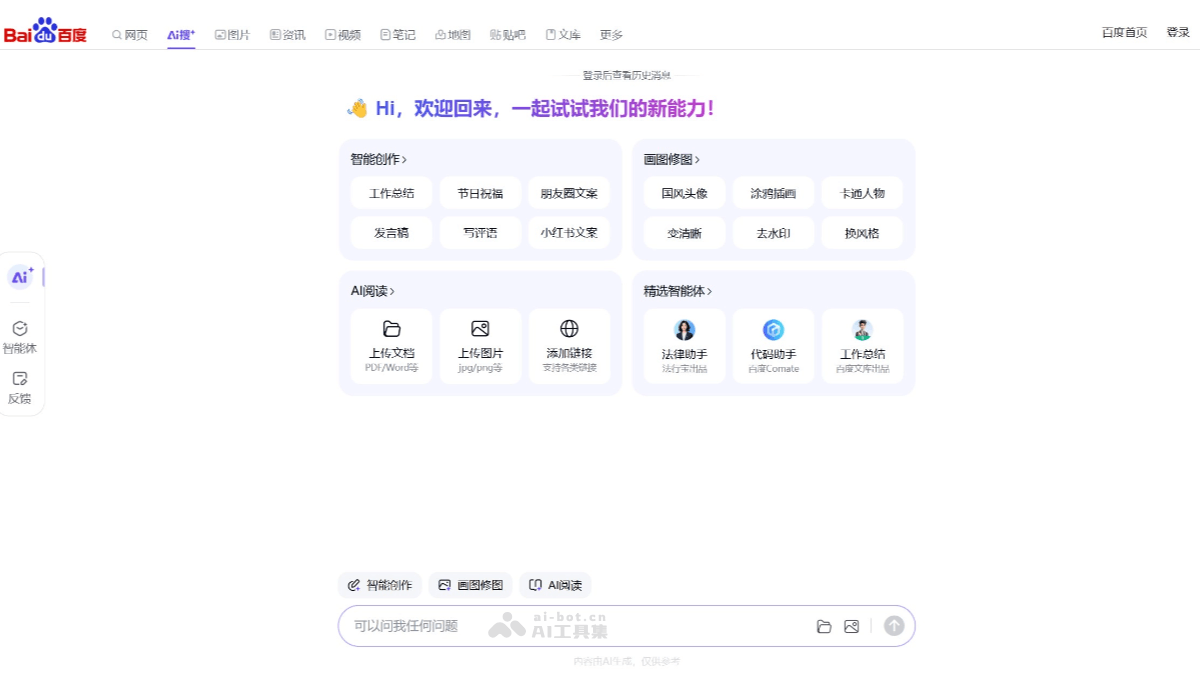
Main features of Baidu AI Search
- Intelligent Creation:
- Work Summary: Helps users quickly generate work summaries.
- Holiday Greetings: Provides users with holiday greetings.
- Moments Copy: Generates copy suitable for Moments.
- Speech Draft: Helps users write speech drafts.
- Write Comments: Provides users with comment-writing services.
- Xiaohongshu Copy: Generates copy suitable for the Xiaohongshu platform.
- Drawing and Photo Editing:
- Guofeng Avatar: Generates avatars with Chinese-style characteristics.
- Doodle Illustration: Provides doodle and illustration creation tools.
- Cartoon Character: Generates cartoon-style character images.
- Enhance Clarity: Improves image clarity.
- Remove Watermark: Removes watermarks from images.
- Change Style: Changes the style of an image.
- AI Reading:
- Document Reading: Supports uploading documents in formats such as PDF/Word for reading.
- Image Reading: Supports uploading images in formats such as jpg/png for reading.
- Link Reading: Supports adding webpage links for content reading.
- Featured Intelligent Agents:
- Legal Assistant: Provides law-related consultation and assistance.
- Code Assistant: Provides assistance with programming code.
- Work Summary: A work summary intelligent agent launched by Baidu Wenku.
How to use Baidu AI Search
- Visit Baidu AI Search: Visit Baidu AI Search'sofficial websiteto enter the AI Search feature.
- Select a feature: On the interface, you can see different feature modules, such as "Intelligent Creation", "Drawing and Photo Editing", "AI Reading", etc. Click the corresponding feature module according to your needs.
- Intelligent Creation: If you need to write a work summary, holiday greetings, Moments copy, etc., click the corresponding option under "Intelligent Creation", then enter the relevant information as prompted, and the AI will help you generate text.
- Drawing and Photo Editing: If you need to create a Guofeng avatar, doodle illustration, or process an image, such as enhancing clarity, removing watermarks, changing styles, etc., click the corresponding option under "Drawing and Photo Editing", upload the image, or follow the prompts.
- AI Reading: If you need to read a document or image, click "Upload Document" or "Upload Image" under "AI Reading", select the file you want to read, and the AI will help you read and understand the content. It also supports providing links to read webpage content.
- Search and Ask Questions: In the search box at the bottom of the page, you can enter any question, and Baidu AI Search will provide you with an answer.
- Log in: If you want to save historical messages or use more personalized services, you can click the "Log in" button in the upper right corner to log in.
Application scenarios of Baidu AI Search
- Decision assistance: When users need to make decisions, AI Search can provide supporting information to help users make wiser choices.
- Knowledge Q&A: For users' various knowledge-related questions, AI Search can provide accurate answers and explanations.
- Topic research: Users can use AI Search to conduct research on specific topics and obtain related materials and information.
- Learning and creation: AI Search supports users in obtaining information and inspiration during learning or creation, improving efficiency.
- Smart summary: AI Search can automatically generate summaries of documents or web page content for users, enabling quick access to core information.
- AI photo editing: Provides image editing and enhancement functions to improve image quality.