
What is AI-Media2Doc
AI-Media2Doc is an open-source audio and video to document tool. Based on AI large model technology, it supports intelligently converting audio and video content into multiple document formats such as Xiaohongshu notes, official account articles, knowledge notes, mind maps, and video subtitles. The tool supports pure frontend processing, requires no local ffmpeg installation, and saves task records locally, ensuring user data security. AI-Media2Doc is suitable for content creators, students, researchers, and other groups, helping to efficiently extract and organize information.
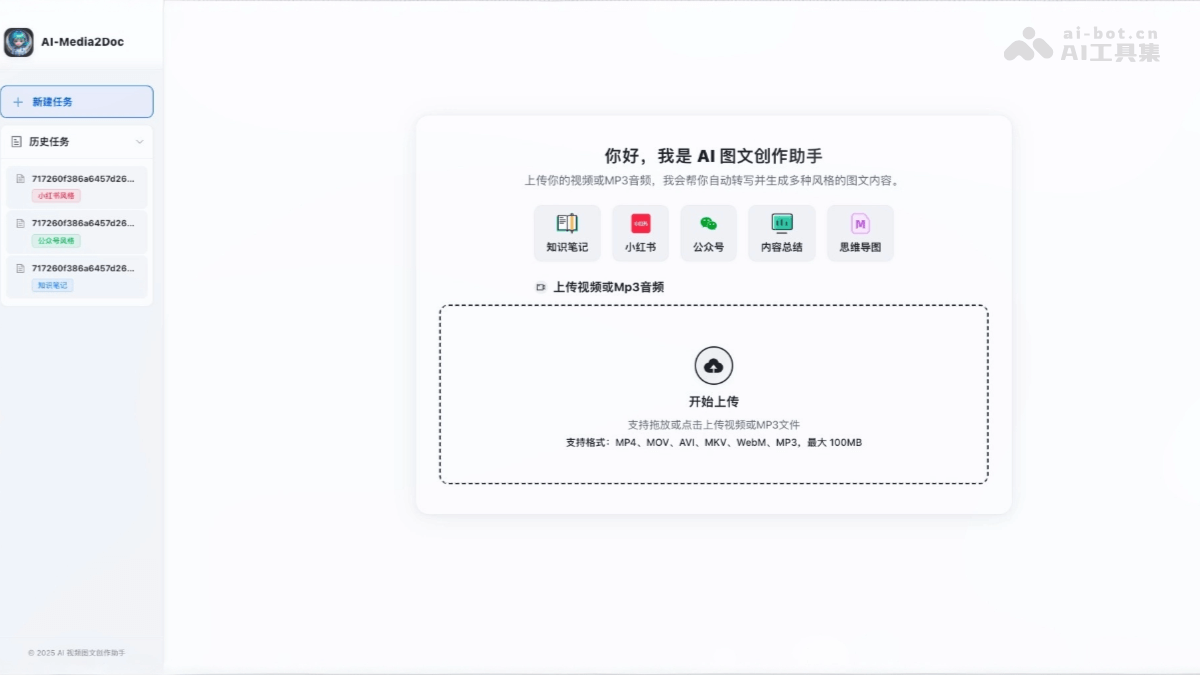
Main features of AI-Media2Doc
- Audio and video to document: Convert audio and video content into multiple document styles with one click, including Xiaohongshu notes, official account articles, knowledge notes, mind maps, and video subtitles.
- AI intelligent processing: Based on large model technology, it achieves content summarization and multi-style document generation, and supports AI Q&A and follow-up conversations based on video content.
- Pure frontend processing: Based on ffmpeg wasm technology, no local ffmpeg installation is required, and it supports direct processing in the browser.
- Privacy protection: No login or registration is required, task records are saved locally, ensuring user data security.
- Local deployment: Supports local operation, with one-click deployment based on Docker, making it convenient for users to use in a local environment.
- Multiple export formats: The generated documents and mind maps can be exported to third-party platforms for further editing and sharing.
How to use AI-Media2Doc
- Local deployment:
- Clone the project code: Open a terminal or command-line tool and run the following command to clone the project code.
git clone https://github.com/hanshuaikang/AI-Media2Doc.git
cd AI-Media2Doc-
- Install Python dependencies (backend): Install the Python dependencies required by the project.
pip install -r backend/requirements.txt-
- Configure environment variables: Create a .env file in the backend directory and fill in the API key.
OPENAI_API_KEY=your_openai_api_key
GROK_API_KEY=your_grok_api_key
DEEPSEEK_API_KEY=your_deepseek_api_key-
- Start the FastAPI service: Start the backend service.
uvicorn backend.main:app --reload-
- Install frontend dependencies and start the service: Install frontend dependencies and start the frontend service.
cd frontend
npm install
npm run serve-
- Access the local server: Open the browser and visithttp://localhost:8080,即可开始使用。
- Usage method:
- Create a new task: Create a new task on the page, upload an audio or video file, or enter an external link address.
- Select output style: Select the desired document style to generate, such as Xiaohongshu, official account, knowledge notes, mind maps, etc.
- Generate graphic and text: Click the "Generate" button, and the system will automatically process the audio and video content to generate the corresponding document.
- Follow-up conversation: Enter a question in the interface on the right (such as "What is the main idea of the video?"), and the AI will answer based on the content.
- Export results: The generated documents and mind maps can be exported to third-party platforms, such as Mubu, ProcessOn, etc., for further editing and use.
Project address of AI-Media2Doc
- GitHub repository:https://github.com/hanshuaikang/AI-Media2Doc
Application scenarios of AI-Media2Doc
- Student learning: Extract online course notes and mind maps for convenient review.
- Teacher lesson preparation: Convert videos into lesson plans to quickly organize course content.
- Self-media Creation: Break down videos to generate illustrated text, scripts, or screenplays, providing creative inspiration.
- Knowledge Management: Convert videos into structured notes for easy management and review.
- Content Creation: Convert videos into WeChat Official Account or Xiaohongshu copy to improve creation efficiency.