
What is AI Dev Gallery
AI Dev Gallery is an open-source AI toolkit and sample library launched by Microsoft, integrated into Visual Studio, helping Windows developers easily integrate on-device AI features. AI Dev Gallery provides over 25 interactive samples, covering scenarios such as text, images, audio, and video, supports downloading popular open-source models from GitHub and Hugging Face, and supports running them locally on devices to achieve low-latency, high-privacy AI experiences. Each sample comes with C# source code and can be exported as a Visual Studio project, simplifying the development process.
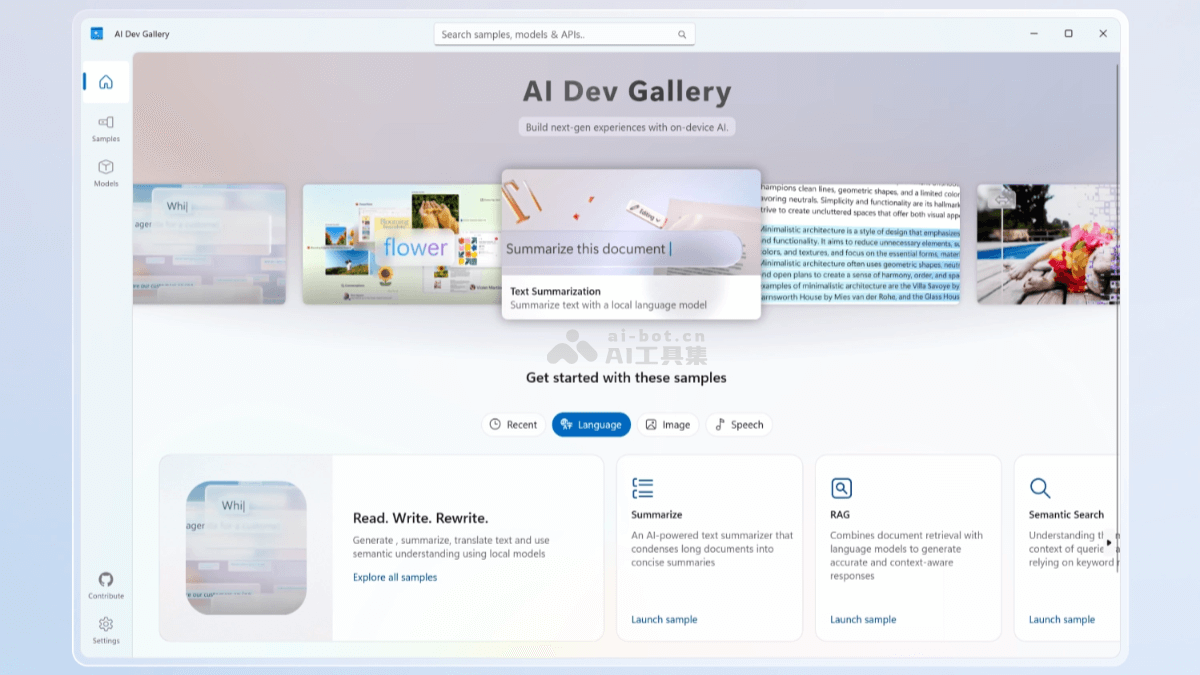
Main features of AI Dev Gallery
- Integrated pre-trained models: Provides a variety of pre-trained AI models, covering multiple fields such as text, images, audio, and video.
- Interactive samples: Provides over 25 interactive samples, allowing developers to intuitively experience the capabilities of different AI models.
- Local model execution: Supports running AI models locally on devices, reducing dependence on cloud services and improving data processing speed and privacy protection.
- Code and project export: Each sample is equipped with C# source code and can be exported as a Visual Studio project, making it convenient for developers to learn and integrate into their own applications.
- Model management: Supports users in downloading new models, changing the models used by samples, and managing downloaded models, including deletion and re-downloading.
- Dual-view navigation: Provides a samples view and a models view, making it convenient for users to navigate and explore according to different needs.
Technical principles of AI Dev Gallery
- Model integration: Integrates pre-trained AI models from Microsoft's own and third-party platforms (such as Hugging Face and GitHub). AI models are trained to handle specific tasks, such as image recognition, text translation, and more.
- Local processing: A key point in the technical principles is deploying AI models on local devices, reducing network latency, improving response speed, and enhancing data security and privacy.
- Interactive user experience: Provides a user-friendly interface, allowing developers to easily test and select different AI models and view the running results of the models.
- Code integration and export: Supports developers in viewing sample code and exporting it as a Visual Studio project.
- Model switching and optimization: Users can choose to run models on CPU or GPU according to device performance, and AI Dev Gallery recommends the most suitable model based on the device's hardware configuration.
Project address of AI Dev Gallery
- Project official website:getting-started-with-the-ai-dev-gallery
- GitHub repository:https://github.com/microsoft/ai-dev-gallery
Application scenarios of AI Dev Gallery
- Image recognition and processing: Develop applications such as image classification, object detection, and image segmentation, used for automated image analysis and processing.
- Natural language processing: Implement NLP functions such as text translation, sentiment analysis, and text summarization to improve text processing capabilities.
- Audio analysis: Develop applications such as speech recognition, speech synthesis, and music classification, used for automated processing of audio content.
- Video analysis: Build applications such as video content recognition, video summarization, and real-time video processing, used in the fields of video surveillance and entertainment.
- Data augmentation: Generate additional training data based on AI models, for use in the training and optimization of machine learning models.