
What is adAI Aidaai
adAI Aidaai is an AI technology-basedPPT generation tool. adAI Aidaai can automatically generate illustrated PPTs with one click within 2 minutes based on user input requirements. Users only need to briefly describe their needs, and the tool can convert them into high-quality PPT text content and intelligently match images. adAI Aidaai provides free services without registration or login, and the last page of the generated PPT contains an advertisement that can be deleted, which users need to delete manually.
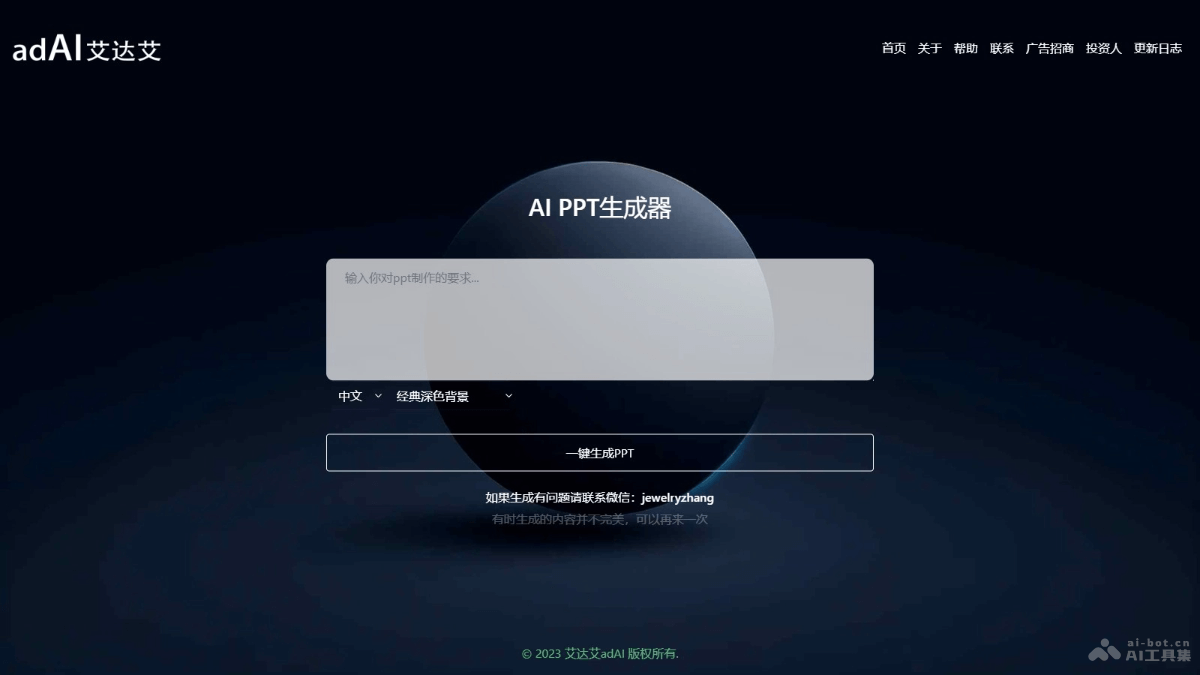
Main features of adAI Aidaai
- One-click PPT generation: Users only need to enter their PPT creation requirements, and adAI Aidaai generates PPT pages containing text content and images with one click.
- Free download: Users can freely download PPT files generated by adAI Aidaai.
- Editing and adjustment: The generated PPT can be opened, edited, and adjusted based on software such as WPS or PowerPoint to meet users' personalized needs.
- No registration or login required: Users do not need to register or log in to use adAI Aidaai's services.
How to use adAI Aidaai
- Visit the website: Visit adAI Aidaai'sofficial website 。
- Enter requirements: In the input box of adAI Aidaai's interface, concisely and clearly describe the theme and content requirements of the PPT you want to generate.
- Generate PPT: Click the "Generate" button, and adAI Aidaai begins to automatically generate the PPT based on the input.
- Choose style:As needed, choose the language and background of the PPT.
- Preview and download: After generation is complete, preview the generated PPT. If satisfied, click the "Download" button to save the PPT to your device.
- Edit and adjust: If further editing and adjustment of the PPT are needed, open the downloaded PPT file with software such as WPS or Microsoft PowerPoint to modify it.
- Delete advertisement: The last page of the PPT contains an advertisement. Delete this page after downloading.
- Share or present: After completing all edits, use the PPT for presentations, meetings, reports, or other occasions as needed.
Application scenarios of adAI Aidaai
- Business presentations: Quickly generate PPTs such as business plans, product introductions, and market analyses to improve work efficiency.
- Education and training: Create teaching courseware, course outlines, academic reports, etc., making teaching content more vivid and intuitive.
- Meeting reports: Quickly prepare PPTs for work meetings, year-end summaries, project reports, and other occasions, saving preparation time.
- Marketing and promotion: Create PPTs for marketing strategies, advertising proposals, brand promotion, etc., to attract the attention of customers and partners.
- Personal resumes: Create PPTs for personal resumes or portfolios for job interviews or personal brand display.