
What is ACE++
ACE++ is an advancedimage generationand editing tool launched by Alibaba Tongyi Lab. Through instruction-based and context-aware content filling technology, it achieves high-quality image creation and editing functions. ACE++ provides multiple models, each targeting different tasks: ACE++ Portrait is used to generate consistent character portraits; ACE++ Subject can maintain subject consistency across different scenes; ACE++ LocalEditing can redraw specific areas of an image while preserving the original structure. The upcoming ACE++ Fully will support more instruction-based editing and reference generation tasks.
Main functions of ACE++
- Image generation
- Character portrait generation: Through the ACE++ Portrait model, high-quality character portraits can be generated according to user-input instructions, while maintaining consistency of the character's facial features and style.
- Subject generation:ACE++ Subject The model can generate images with a specific subject in different scenes, for example, placing a certain logo or object in different backgrounds.
- Image editing
- Local editing:ACE++ LocalEditing The model supports redrawing or modifying specific areas of an image while preserving the structure and style of the original image. For example, it can modify a character's clothing, background, or the appearance of a specific object.
- Stylized editing: Users can stylize images through instructions, for example, converting ordinary photos into artistic styles or specific visual effects.
- Context-aware content filling: It can intelligently fill in missing parts or parts that need modification based on the image's contextual information, ensuring that the generated image is visually natural and consistent.
- Instruction-driven interaction: Users can control the image generation and editing process through simple natural language instructions. For example, users can specify generating a character portrait in a specific style, or request adding, deleting, or modifying an element in the image.
- Multi-task support: ACE++ supports multiple image processing tasks, including but not limited to:
- Virtual try-on: Through the ACE++ Subject model to achieve virtual try-on effects.
- Logo pasting: Place logos or brand elements in different items or scenes.
- Photo restoration: Repair and enhance damaged or blurry photos.
- Movie poster editing: Generate or modify movie posters while maintaining consistency of characters and scenes.
Technical principles of ACE++
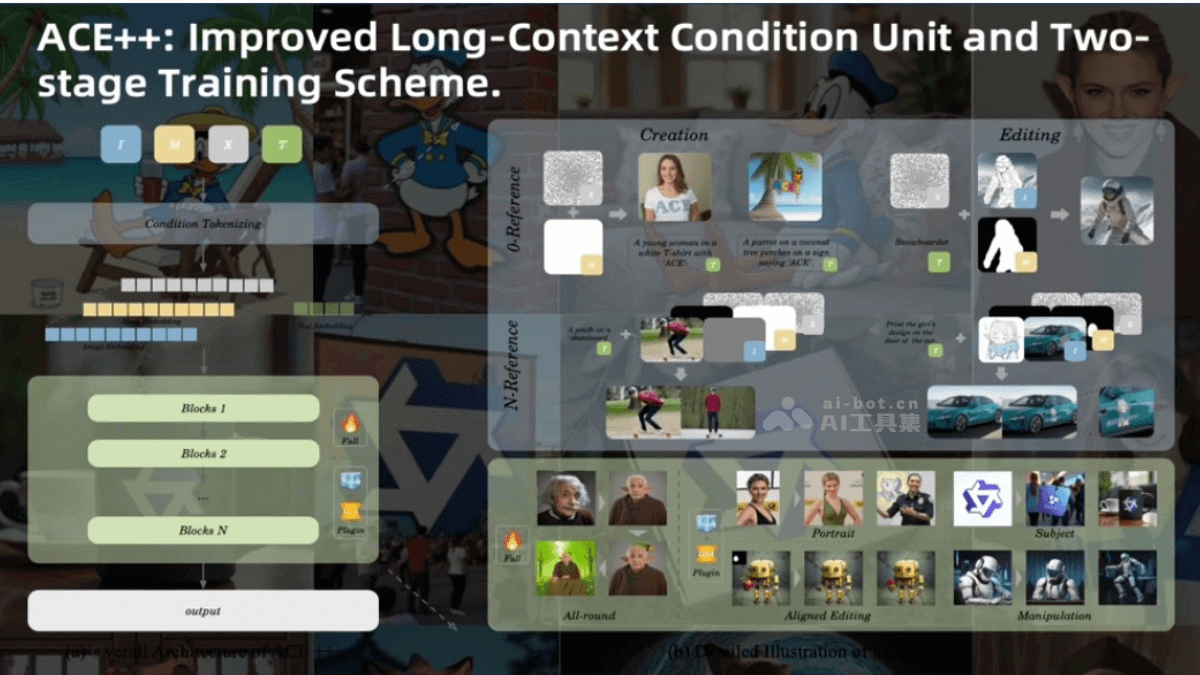
- Improved long context condition unit (LCU++): ACE++ proposes the LCU++ input paradigm, which concatenates the input image, mask, and noise along the channel dimension to form a condition unit (CU) feature map, rather than the traditional sequence concatenation method. This improvement reduces interference in the context-aware framework and lowers the model adaptation cost. The input format of LCU++ can be extended to reference-free image (0-ref) tasks and multi-reference image (N-ref) tasks, enhancing the model's adaptability to different tasks.
- Two-stage training scheme: ACE++ adopts a two-stage training approach. In the first stage, the model is pre-trained based on a text-to-image model, focusing on the 0-ref task, and quickly adapts to conditional inputs based on the generative capabilities of the base model. In the second stage, the model is fine-tuned on all data, supports general instructions, and simultaneously optimizes the model's reconstruction capability for input reference images and generation capability for target images.
- Model Architecture: The overall architecture of ACE++ integrates the LCU++ paradigm, mapping CU feature maps into serialized tokens through the x-embed layer as input to the Transformer layer. The model training objective is to minimize the mean squared error between the predicted velocity and the ground-truth velocity, endowing the model with context-aware generation capabilities.
- Task Support and Model Optimization: ACE++ provides a toolkit that supports a variety of image editing and generation tasks, including portrait consistency, subject consistency, local editing, etc. For common application scenarios, ACE++ has trained lightweight domain-stable fine-tuned models, such as LoRA strategies, to improve the model's performance in specific tasks.
ACE++ Project Address
- Project Website:https://ali-vilab.github.io/ACE_plus
- Github Repository:https://github.com/ali-vilab/ACE_plus
- HuggingFace Model Library:https://huggingface.co/ali-vilab/ACE_Plus
- arXiv Technical Paper:https://arxiv.org/pdf/2501.02487
Application Scenarios of ACE++
- Virtual Try-On: Through the ACE++ Subject model, users can place clothing or accessories on different character models to achieve virtual try-on effects. Different clothing styles and combinations can be displayed on virtual characters, helping designers quickly evaluate design effects, or providing personalized try-on experiences for e-commerce platforms.
- Brand Logo Placement: In product design or advertising production, the ACE++ Subject model can embed brand logos or design elements into different backgrounds or objects.
- Photo Editing: ACE++ supports various editing operations on existing photos, including style transfer, element addition or removal, background replacement, etc.
- Movie Poster Editing: With the ACE++ Portrait model, character portraits in movie posters can be stylized or modified. Adjust character expressions, clothing styles, or add specific artistic effects to posters, meeting the diverse needs of movie promotion.
- Local Editing:The ACE++ LocalEditing model can repaint or modify specific areas of an image while preserving the structure and style of the original image. Repair scratches and stains in photos, or beautify a certain part of a person.
- Artistic Creation and Design: Artists and designers can use ACE++'s generation and editing functions to quickly realize creative ideas. Generate initial design sketches based on text descriptions, or stylistically modify existing designs to improve creative efficiency.