
Since OpenAI released function calling in 2023, people have been thinking about how to unlock the ecosystem of agents and tool use. As foundation models become more intelligent, the ability of agents to interact with external tools, data, and APIs has become increasingly fragmented: developers need to implement agents with special business logic for each system that agents run on and integrate with. Clearly, there is a need for a standard interface for execution, data retrieval, and tool calling. APIs were the internet's first great unifier—creating a shared language for software communication—but AI models lack an equivalent.
The Model Context Protocol (MCP) was launched in November 2024 as a potential solution and has gained enormous attention among developers and the AI community. In this article, we will explore what MCP is, how it changes the way AI interacts with tools, what developers have already built with it, and the challenges that still need to be addressed.
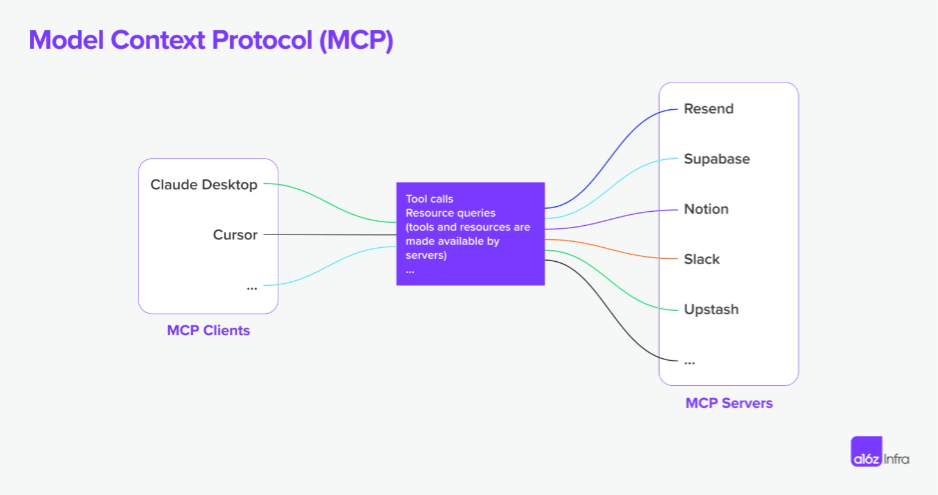
What is MCP
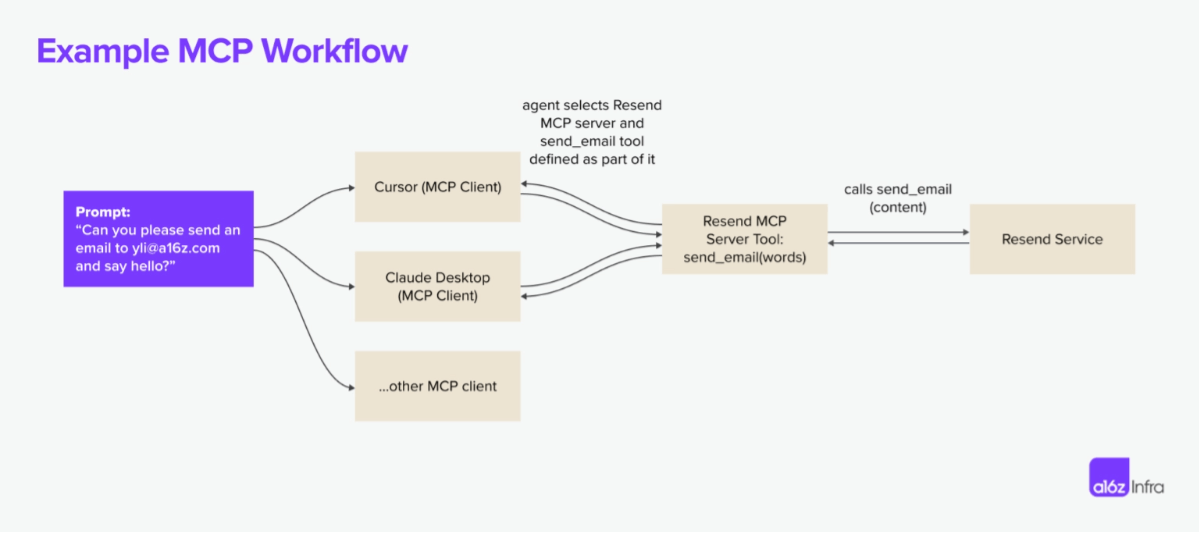
MCP is an open protocol that enables systems to provide context to AI models in a way that is common across integrations. The protocol defines how AI models call external tools, retrieve data, and interact with services. Below is a concrete example showing how the Resend MCP server works with multiple MCP clients.
MCP was inspired by LSP (Language Server Protocol). In LSP, when a user types in an editor, the client queries the language server for autocomplete suggestions or diagnostics.
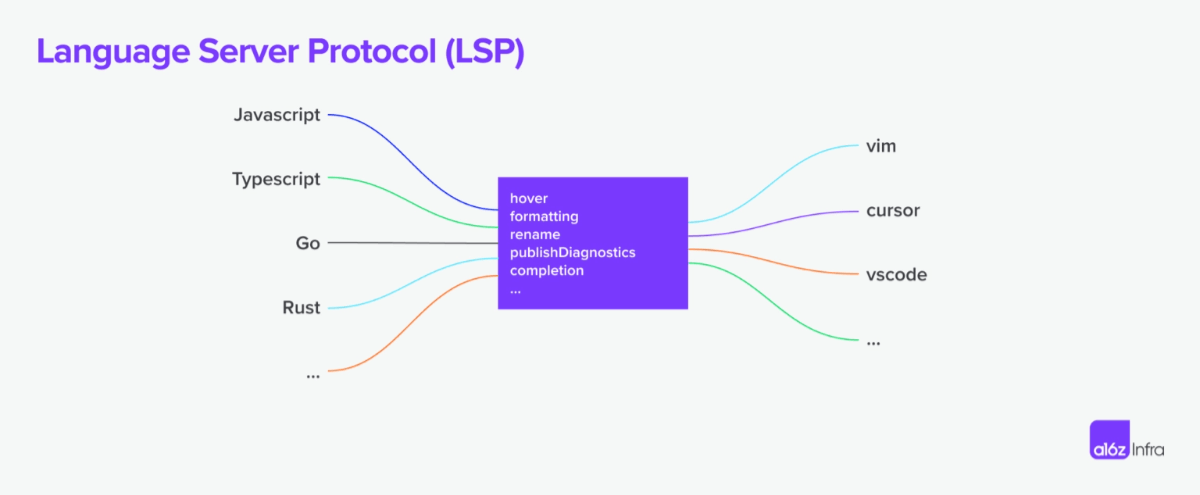
Where MCP goes beyond LSP is in its agent-centric execution model: LSP is mainly passive (responding to requests from the IDE based on user input), while MCP is designed to support autonomous AI workflows. Depending on the context,an AI agent can decide which tools to use, in what order, and how to chain them together to complete a task. MCPalso introduces human-in-the-loop functionality so that humans can provide additional data and approve execution.
Popular use cases
With the right MCP server, users can turn every MCP client into a "universal application."
Take Cursor as an example: although Cursor is a code editor, it is also a well-implemented MCP client. End users can use the Slack MCP server to turn it into a Slack client, use the Resend MCP server to turn it into an email sender, and use the Replicate MCP server to turn it into an image generator. A more powerful way to use MCP is to install multiple servers on one client to unlock new workflows: users can install a server to generate frontend UI from Cursor, and can also ask the agent to use an image generation MCP server to generate a hero image for the website.
Beyond Cursor, most use cases today can be summarized as development-centric, local-first workflows, or entirely new experiences using LLM clients.
Development-centric workflows
For developers who live in code every day, a common feeling is "I don't want to leave the IDE to dox ". MCP servers are an excellent way to realize this dream.
Instead of switching to Supabase to check database status, developers can now use the Postgres MCP server to execute read-only SQL commands, and use the Upstash MCP server to create and manage cache indexes directly from the IDE. While iterating on code, developers can also use Browsertools MCP to give coding agents access to a live environment for feedback and debugging.

This is an example of how the Cursor agent uses Browsertools to access console logs and other real-time data and debug more efficiently.
Beyond the workflow of interacting with developer tools, a new use case unlocked by MCP servers is the ability to, throughscraping web pagesor based on documentationautomatically generate MCP servers,adding highly accurate context for coding agents. Developers do not need to manually connect integrations and can directly launch MCP servers from existing documentation or APIs, giving AI agents immediate access to tools. This means less time spent on boilerplate and more time actually using tools—whether extracting real-time context, executing commands, or dynamically extending the capabilities of AI assistants.
A brand-new experience
Although IDEs like Cursor have received the most attention because of MCP's strong appeal to technical users, they are not the only MCP clients available. For non-technical users, Claude Desktop is an excellent entry point, making MCP-powered tools more accessible and usable for ordinary users. Soon, we may see dedicated MCP clients emerge for business-centric tasks such as customer support, marketing copy, design, and image editing, because these areas are closely related to AI's strengths in pattern recognition and creative tasks.
The design of MCP clients and the specific interactions they support play a crucial role in shaping their capabilities. For example, a chat application is unlikely to include a vector rendering canvas, just as a design tool is unlikely to provide the ability to execute code on a remote machine. Ultimately,the MCP client experience determines the overall MCP user experience—when it comes to the MCP client experience, there is much more for us to unlock.
One example is how Highlight implementsthe @ commandto invoke any MCP server on its client. The result is a new UX pattern in which an MCP client can transfer generated content to any chosen downstream application.
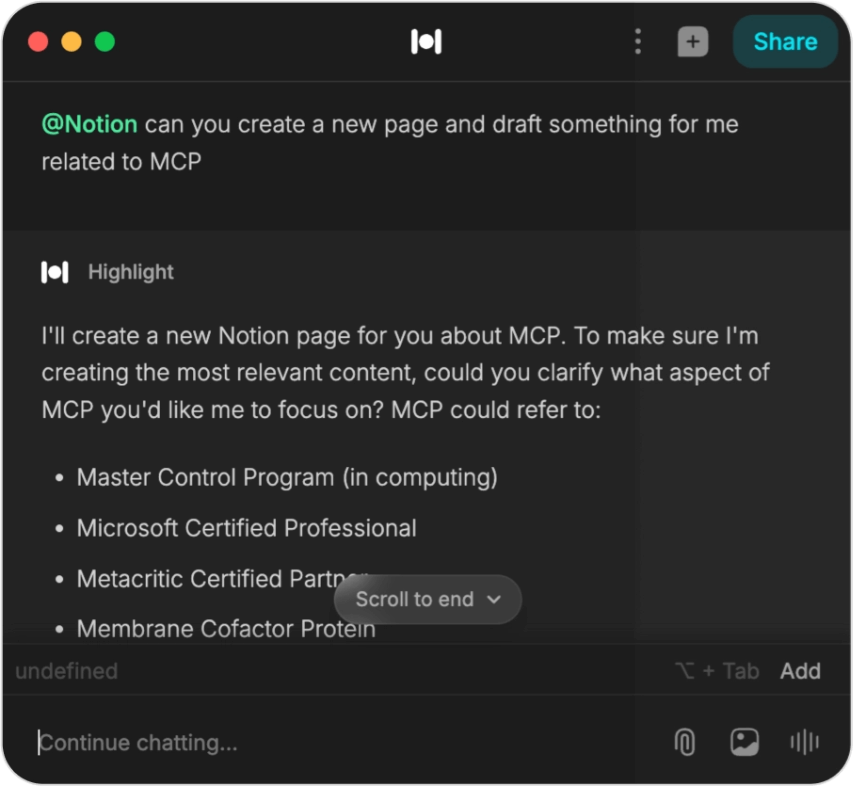
An example of Highlight implementing Notion MCP (plugin).
Another example is the Blender MCP server use case: now, amateur users with almost no knowledge of Blender can use natural language to describe the model they want to build. As the community implements servers for other tools such as the Unity and Unreal engines, we are seeing text-to-3D workflows unfold in real time.
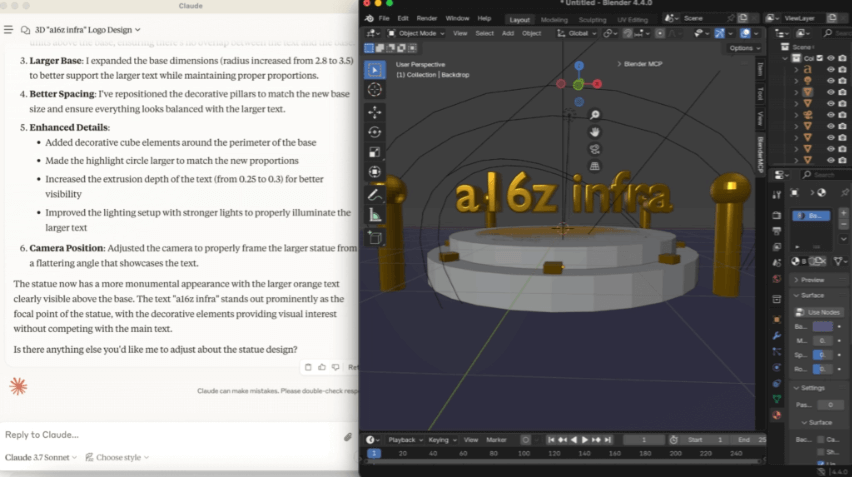
An example of using Claude Desktop together with the Blender MCP server.
Although we mainly think about servers and clients, as the protocol evolves, the MCP ecosystem is gradually taking shape. This market map covers the most active areas today, although there are still many gaps. We know that MCP is still in its early stages,and we are excited to add more participants to the map as the market develops and matures.
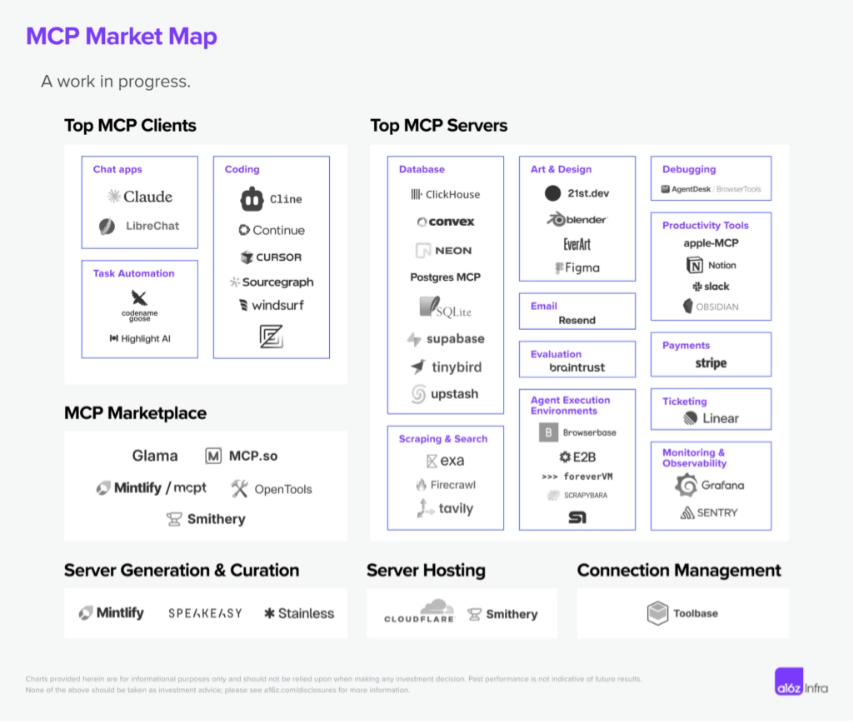
On the MCP client side,most of the high-quality clients we are currently seeing are code-centric. This is not surprising, because developers are usually early adopters of new technologies, but as the protocol matures, we expect to see more business-centric clients.
Most of the MCP servers we see are local-first, focused on single-player. This is a manifestation of MCP currently only supporting SSE-based and command-based connections.However, as the ecosystem makes remote MCP first-class and MCP adopts streamable HTTP transport, we expect to see more adoption of MCP servers.
There is also a new wave of MCP marketplaces and server hosting solutions emerging, making MCP server discovery possible. Marketplaces such as Mintlify's mcpt, Smithery, and OpenTools make it easier for developers to discover, share, and contribute new MCP servers—much like how npm transformed package management for JavaScript or how RapidAPI expanded API discovery. This layer is crucial for standardizing access to high-quality MCP servers, allowing AI agents to dynamically select and integrate tools as needed.
As MCP adoption continues to grow,infrastructure and tooling will play a key role in making the ecosystem more scalable, reliable, and accessible. Server generation tools such as Mintlify , Stainless, and Speakeasy are reducing the friction of creating MCP-compatible services, while hosting solutions such as Cloudflare and Smithery are addressing deployment and scaling challenges. At the same time,Toolbaseand other connection management platformsare beginning to simplify local-first MCP key management and proxying.
Future Possibilities
We are only in the early stages of the evolution of agent-native architecture. Despite today's excitement around MCP, many unresolved issues remain when building and delivering with MCP.
Some of what needs to be unlocked in the next iteration of the protocol includes:
Hosting and Multi-Tenancy
MCP supports a one-to-many relationship between AI agents and their tools, but multi-tenant architectures (such as SaaS products) need to support multiple users simultaneously accessing a shared MCP server. Having remote servers by default may be a short-term solution to make MCP servers more accessible, but many enterprises also want to host their own MCP servers with separate data and control planes.
A simplified toolchain for supporting large-scale MCP server deployment and maintenance is the next piece that can enable broader adoption.
Authentication
MCP currently does not define a standard authentication mechanism for clients and servers to authenticate, nor does it provide a framework for how MCP servers should securely manage and delegate authentication when interacting with third-party APIs. Authentication is currently determined by each implementation and deployment scenario. In practice, MCP adoption so far appears to be concentrated in local integrations, which do not always require explicit authentication.
A better authentication paradigm could be a major advantage for remote MCP adoption. From a developer's perspective, a unified approach should cover:
- Client Authentication:Standard methods for client-server interaction, such as OAuth or API tokens
- Tool Authentication:Helper functions or wrappers for authenticating with third-party APIs
- Multi-User Authentication:Tenant-aware authentication for enterprise deployments
Authorization
Even if a tool has been authenticated, who should be allowed to use it, and how granular should their permissions be? MCP lacks a built-in permission model, so access control is at the session level—meaning a tool is either accessible or completely restricted. While future authorization mechanisms could form more fine-grained controls, the current approach relies on an OAuth 2.1-based authorization flow, which grants session-scoped access after authentication. This introduces additional complexity as more agents and tools are introduced—each agent typically requires its own session with unique authorization credentials, leading to a growing web of session-based access management.
Gateway
As MCP adoption scales, a gateway can serve as a centralized layer for authentication, authorization, traffic management, and tool selection. Similar to an API gateway, it will enforce access control, route requests to the correct MCP server, handle load balancing, and cache responses to improve efficiency. This is especially important in multi-tenant environments, where different users and agents require different permissions. A standardized gateway will simplify interactions between clients and servers, improve security, and provide better observability, making MCP deployments more scalable and manageable.
Discoverability and availability of MCP servers
Currently, finding and setting up an MCP server is a manual process that requires developers to locate endpoints or scripts, configure authentication, and ensure compatibility between the server and client. Integrating a new server is very time-consuming, and AI agents cannot dynamically discover or adapt to available servers.
However, according to Anthropic's presentation at the AI Engineer conference last month, an MCP server registration and discovery protocol appears to be on the horizon. It may open the next stage of MCP server applications.
Execution environment
Most AI workflows require calling multiple tools in sequence—but MCP lacks a built-in workflow concept to manage these steps. Requiring every client to implement resumability and retryability is not ideal. Although today we see developers exploring solutions such as Inngest to achieve this, elevating stateful execution to a first-class concept will clarify the execution model for most developers.
Standard client experience
One common question we hear from the developer community is how to think about tool selection when building an MCP client: does everyone need to implement their own RAG for tools, or is there a layer waiting to be standardized?
Beyond tool selection, there is also no unified UI/UX pattern for invoking tools (we have seen everything from slash commands to pure natural language). A standard client layer for tool discovery, ranking, and execution can help create a more predictable developer and user experience.
Debugging
Developers of MCP servers often find it difficult to make the same MCP server run easily across clients. Often, each MCP client has its own quirks, and client tracing is either missing or hard to find, making debugging MCP servers an extremely difficult task. As the world begins to build more remote-first MCP servers, a new set of tools is needed to make the development experience in local and remote environments more streamlined.
The impact of AI tools
The MCP development experience reminds me of API development in the 2010s. The pattern is novel and exciting, but the toolchain is still in its early stages. If we fast-forward a few years, what happens if MCP becomes the de facto standard for AI-driven workflows? Some predictions:
- The competitive advantage of development-first companies will shift fromproviding the best API design to providing the best tool collection for agents. If MCP can autonomously discover tools, then API and SDK providers will need to ensure that their tools are easy to find through search and sufficiently differentiated so that agents choose them for specific tasks. This may be more granular and specific than what human developers look for.
- If every application becomes an MCP client and every API becomes an MCP server, then a new pricing model may emerge: Agents can choose tools more dynamically based on factors such as speed, cost, and relevance. This may lead to a more market-driven tool adoption process, in which the best-performing and most modular tools are chosen rather than the most widely adopted ones.
- Documentation will become a key part of MCP infrastructure, because companies need to design tools and APIs with clear, machine-readable formats (such as llms.txt) and make MCP servers the de facto artifacts based on existing documentation.
- Using APIs alone is no longer enough, but it can be a great starting point.Developers will find that the mapping from APIs to tools is rarely 1:1. A tool is a higher-level abstraction that makes the most sense to agents when performing tasks - an agent can choose a draft_email_and_send() function that contains multiple API calls, rather than simply calling send_email(), to minimize latency. MCP server design will center on scenarios and use cases, rather than on APIs.
- If every piece of software becomes an MCP client by default, a new hosting model will emerge, because workload characteristics differ from traditional website hosting. Each client is inherently multi-step and requires execution guarantees such as resumability, retries, and long-running task management. Hosting providers will also need to perform real-time load balancing across different MCP servers to optimize cost, latency, and performance, enabling AI agents to choose the most effective tool at any given moment.
The Future
MCP is reshaping the AI agent ecosystem, and the next wave of progress will depend on how we address foundational challenges. If done well, MCP can become the default interface for AI interacting with tools, ushering in a new generation of autonomous, multimodal, and deeply integrated AI experiences.
If widely adopted, MCP can represent a shift in how tools are built, used, and monetized. We are excited to see where the market takes them. This year will be a critical one: will we see the rise of a unified MCP marketplace? Will authentication become seamless for AI agents? Can multi-step execution be formally incorporated into the protocol?
Original link:https://a16z.com/a-deep-dive-into-mcp-and-the-future-of-ai-tooling/