
Add the agent Tasks tab -- schedule automated tasks that run your
agent on a cron cadence (one-off, daily, weekly, or monthly), then track
each run. The tab bundles four surfaces into one component: a searchable,
date-filterable task list with status badges, metric cards (total /
completed / failed), a Schedule Task dialog, a per-task run-logs panel,
and a log-details modal. This is one tab in the wider agent-settings
family (access, api, datasets, disclaimers, embed, history,
llm, memory, prompts, safety, settings, tasks, tools). Each
tab is a separate skill. All tabs share the same AgentSettingsProvider
wrapper -- set it up once and mount as many tabs as you need.


Common setup (brand, conventions, env files, verification): see docs/skill-setup.md.
Prerequisites
- Auth must be set up first (
/iblai-vibe-auth) - MCP server + skills configured (
@iblai/mcpin.mcp.json) AgentSettingsProvidermust wrap the route (see/iblai-vibe-agent-settingStep 2 if not already set up)- Ask the user for a real
mentorId(agent UUID). Do NOT invent one.
Step 1: Check Environment
Before proceeding, check for an iblai.env in the project root. Look for
PLATFORM, DOMAIN, and TOKEN variables. If the file does not exist or
is missing these variables, tell the user:
"You need an iblai.env with your platform configuration. Download the
template and fill in your values:
curl -o iblai.env https://raw.githubusercontent.com/iblai/vibe/refs/heads/main/iblai.env"
Step 2: Mount AgentTasksTab
// app/(app)/agents/[mentorId]/tasks/page.tsx
"use client";

import { AgentTasksTab } from "@iblai/iblai-js/web-containers/next";

export default function AgentTasksPage() {
  return (
    <div className="flex h-full flex-col bg-white">
      <AgentTasksTab />
    </div>
  );
}
AgentTasksTab reads tenantKey, mentorId, and username from
AgentSettingsProvider (via useAgentSettings()) and handles all of its
own data fetching and mutations (list, create, delete, run logs). No
props are required.
With custom pagination
Both the task list and the run-logs panel paginate (5 per page). Without a
PaginationComponent the built-in web-containers IblPagination is used.
Inject your own to match the host app's pagination UI:
<AgentTasksTab
  PaginationComponent={({ currentPage, totalPages, onPageChange, disabled }) => (
    <MyPagination
      page={currentPage}
      total={totalPages}
      onChange={onPageChange}
      disabled={disabled}
    />
  )}
/>;
Step 3: Customize Labels (Optional)
AgentTasksTab renders with the default agent-facing copy
(AGENT_TASKS_TAB_LABELS). Override any string via the labels prop. Pass
a full TasksTabLabels bundle (for a full agent re-skin) or a
partial object (for one-off edits).
import {
  AgentTasksTab,
  type TasksTabLabels,
  AGENT_TASKS_TAB_LABELS,
} from "@iblai/iblai-js/web-containers/next";

<AgentTasksTab
  labels={{
    header: {
      title: "Scheduled tasks",
      description: "Schedule automated runs for your agent.",
    },
    toolbar: { scheduleTask: "New task" },
  }}
/>;
The label bundle is grouped by surface: header, toolbar, metrics,
list, logs, states, scheduleDialog, deleteDialog, logDetails,
and toasts. Override only the keys you need.
Step 4: Use MCP Tools for Customization
get_component_info("AgentTasksTab")
get_component_info("AgentSettingsProvider")
Tab surfaces
AgentTasksTab is a single mounted component, but it renders four distinct
surfaces. The corresponding web-containers source (under
web-containers/.../edit-mentor-modal/tabs/tasks-tab) is listed for
reference -- these pieces are internal to AgentTasksTab and are not
mounted separately.
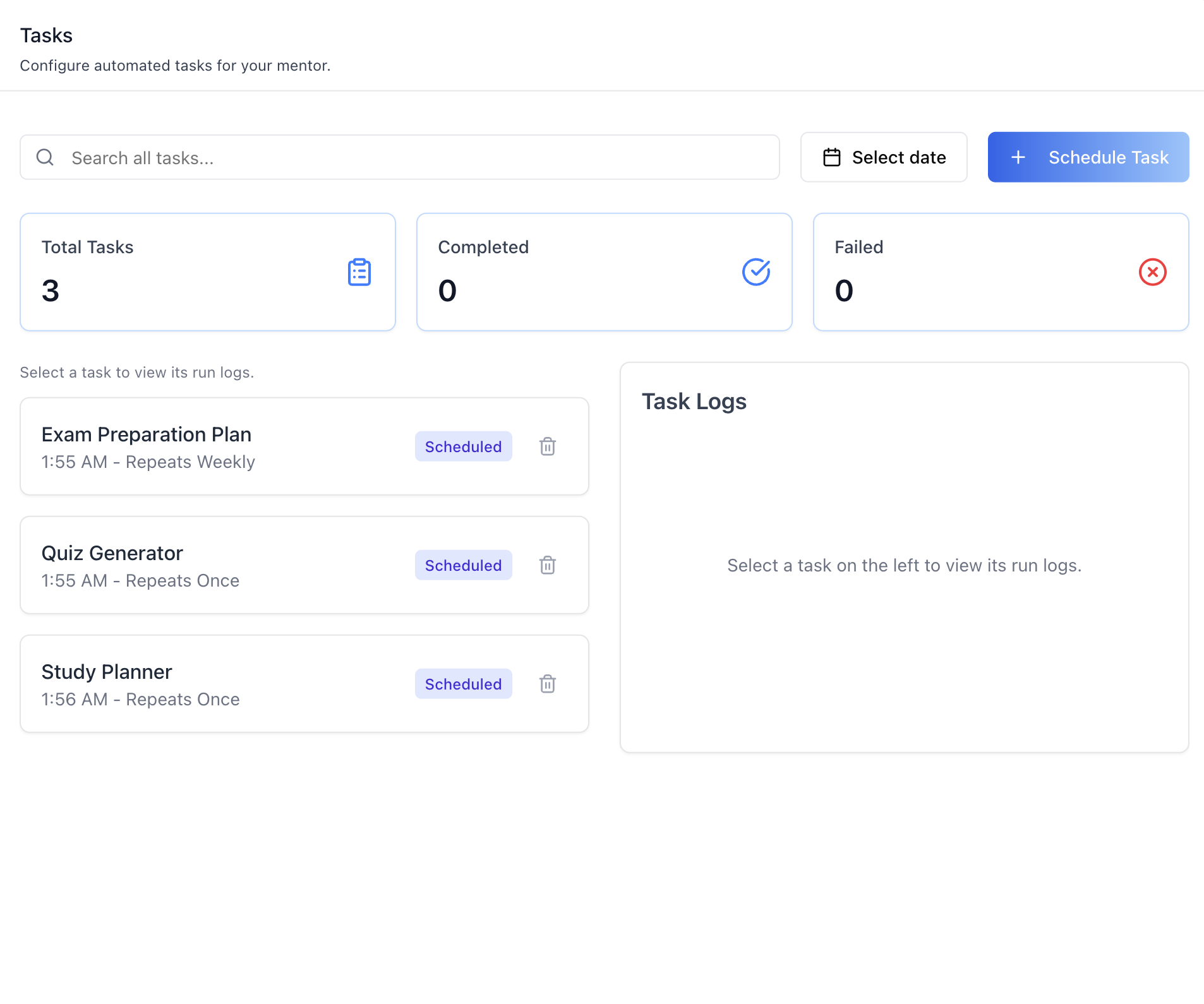
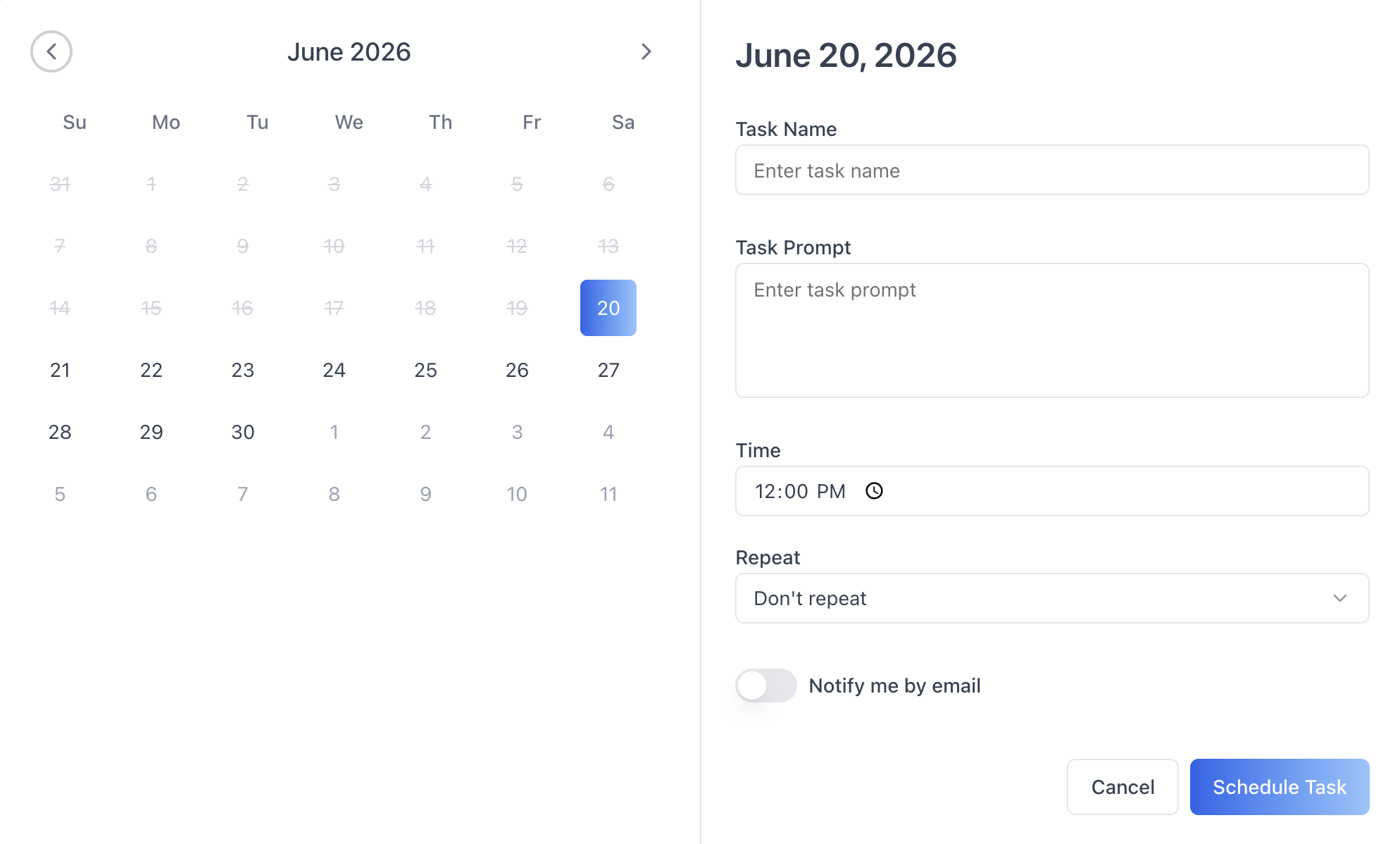
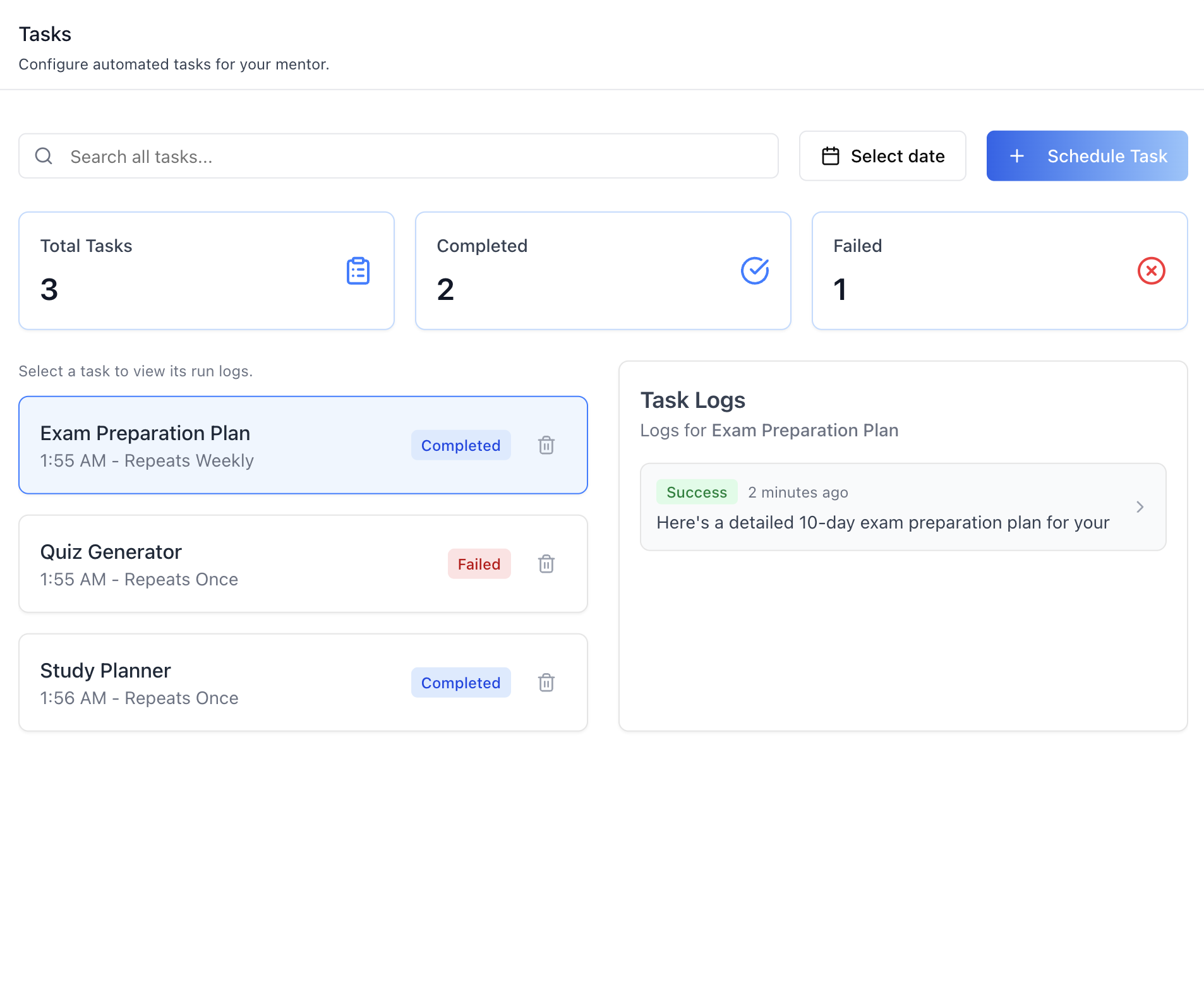
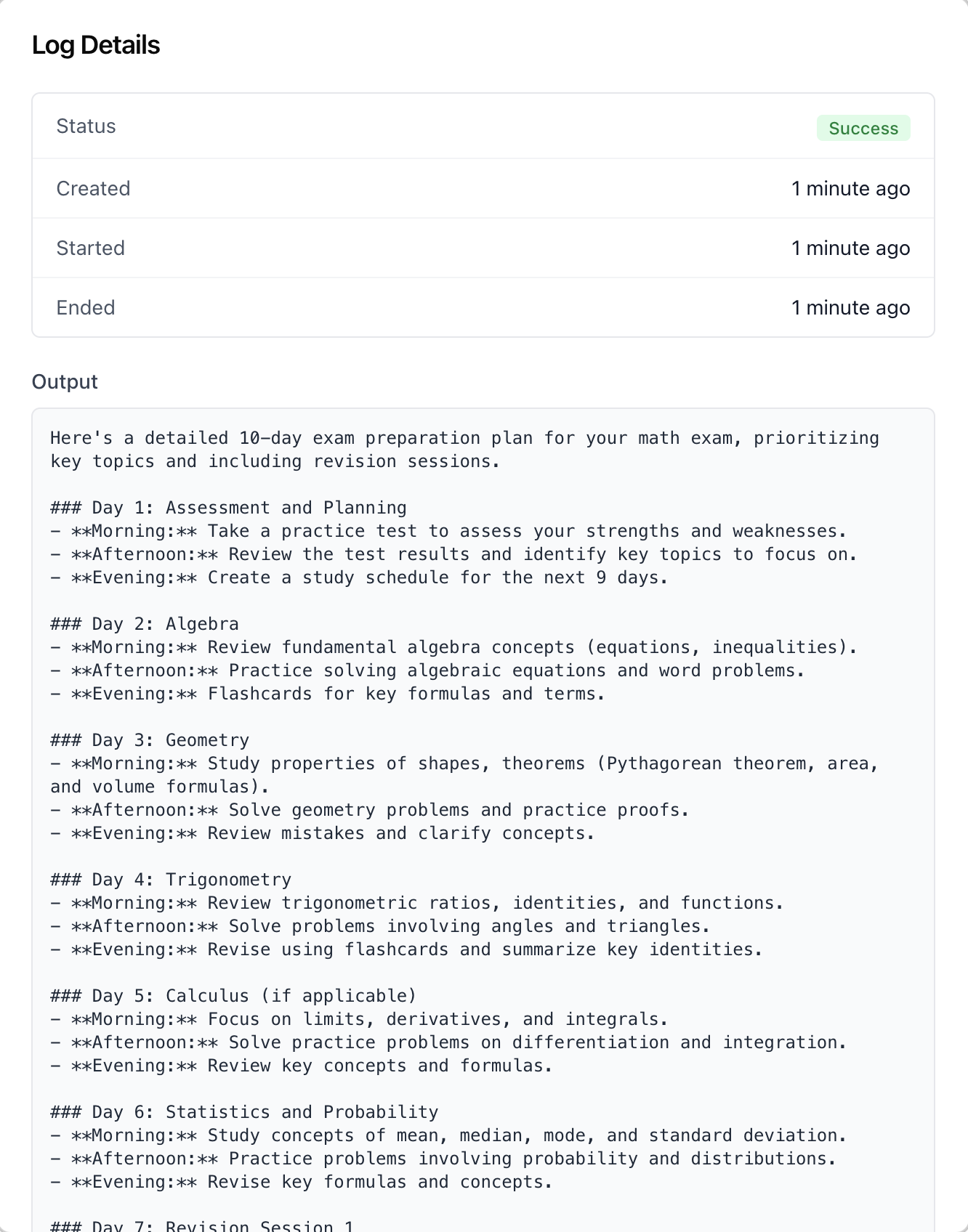
| Surface | Screenshot | Source component | What it shows |
|---|---|---|---|
| Task list | list | tasks-tab-content / task-list / task-metrics-cards / tasks-tab-toolbar |
Search + date filter + Schedule Task button, metric cards (Total / Completed / Failed), and a list of tasks with time, repeat cadence, and a status badge (Scheduled / Running / Completed / Failed / Disabled) |
| Schedule Task dialog | create | schedule-task-dialog |
Calendar date picker plus Task Name, Task Prompt, Time, Repeat (Don't repeat / Daily / Weekly / Monthly), and a "Notify me by email" toggle |
| Run-logs panel | logs | task-logs-panel |
Per-task run logs; click a task on the left to load its logs, click a log row to open its details |
| Log Details modal | log details | task-log-details |
A single run's status, Created / Started / Ended timestamps, and full output |
Repeat cadence maps to a cron schedule: "Don't repeat" creates a one_off
task pinned to the chosen date; Daily / Weekly / Monthly create a recurring
cron. The list status is derived from the latest run log combined with the
task's enabled flag -- a one-off that ran successfully shows Completed,
not Disabled.
<AgentTasksTab> Props
Import from @iblai/iblai-js/web-containers/next.
| Prop | Type | Required | Description |
|---|---|---|---|
PaginationComponent |
ComponentType<{ currentPage, totalPages, onPageChange, disabled, disableNumberedButtons? }> |
No | Custom pagination for the task list and logs panel. Defaults to the web-containers IblPagination |
labels |
DeepPartial<TasksTabLabels> |
No | Override user-visible strings |
Related Exports
From @iblai/iblai-js/web-containers/next:
AGENT_TASKS_TAB_LABELS-- the default agent-facing label bundle.TasksTabLabels-- type for the full label bundle.TaskListItem-- a periodic agent normalized for the list (id,name,time,repeat,oneOff,enabled,status,rawData).TaskLog-- a run log normalized for the logs panel (id,entry,timestamp,periodicAgentId,status,startTime,endTime).TaskDisplayStatus-- the derived status union (Disabled|Running|Failed|Completed|Scheduled).
Step 5: Verify
Run /iblai-vibe-ops-test before telling the user the work is ready:
pnpm build-- must pass with zero errorspnpm test-- vitest must pass- Start dev server and touch test:
pnpm dev &
npx playwright screenshot http://localhost:3000/agents/<id>/tasks /tmp/agent-tasks.png
Important Notes
- Redux store: Must include
mentorReducerandmentorMiddleware-- the periodic-agent API slice (list / create / delete / logs) ships inside those bundles. initializeDataLayer(): 5 args (v1.2+)@reduxjs/toolkit: Deduplicated via webpack aliases innext.config.ts- Peer deps:
sonnerand@iblai/iblai-web-mentormust be installed (pnpm add sonner @iblai/iblai-web-mentor) - Shared provider:
AgentSettingsProvidermust wrap the route at a layout level. See/iblai-vibe-agent-settingStep 2 for the full snippet. - One-off vs recurring: "Don't repeat" flags the task
one_off; the backend runs it once and the scheduler auto-disables it afterward. The list still shows the last outcome (e.g. Completed), not Disabled. - Start time: The dialog combines the picked date and time into the
task's
start_time; it must be in the future or the dialog blocks save. - Brand guidelines: BRAND.md